

Tips to help you get started
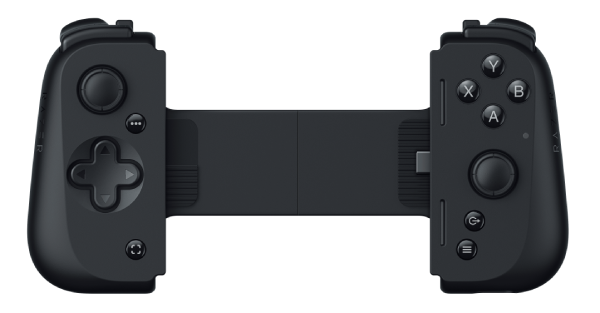
Device Layout
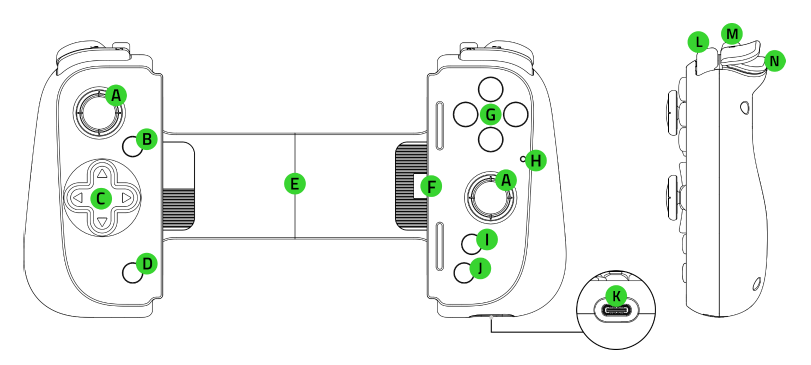
- Clickable analog thumbsticks (L3/R3)
- Options button
- D-pad
- Share button
- Extendable bridge
- USB Type C connector
- Face buttons
- Status indicator
- Razer Nexus button
- Menu button
- USB Type C port*
- Bumpers (L1/R1)
- Multi-function buttons (L4/R4)
- Triggers (L2/R2)
*Only supports PC connection and passthrough charging. USB Type C audio and other accessories are not supported.
Full Technical Specifications
| Category | Specification | |
|---|---|---|
|
Features |
|
|
| Compatible Devices |
|
|
How To
How do I register my Razer device using the serial or part number?
Input the complete part or product number that matches the serial number. See the answer below for more details.
How do I complete my controller update after an interruption?
- Detach and reattach the controller to your phone.
- Force close and relaunch the Razer Nexus app.
- Restart the firmware update process.
How do I enable the screenshot and video record buttons on my Razer controller?
Install the Razer Nexus app to enable the buttons.
How do I remove and reattach rubber cushions on my Razer Kishi V2 USB-C?
- Pull the rubber cushion gently in an outward direction.
- Insert the rubber cushion firmly until it is fully inserted.
How do I get my Razer controller to work with a specific app or game?
Contact the developer of the game and ask for standard Android or MFi controller support. See the answer below for more details.
How do I use my Razer controller while the phone is charging?
Turn off the OTG settings of your phone to allow the controller to work even while charging.
Phone models that have OTG settings:
- Oppo
- OnePlus
How do I get my Razer device to work with a specific program or game?
- Test the device in another application.
- If the Razer device works properly in another application, make the necessary adjustments within the specific program.
How do I enable button inputs for my Razer controller on Android 11?
Disable the “Accessibility option” in your phone’s setting including apps and services that have been enabled under the “Accessibility” menu, such as:
- Macrodroid
- Tasker
- Autoclicker,
- Automate, and the like.
See Android Issue Tracker for more details.
How do I optimize battery usage with the Razer controller even when idle?
Remove the controller from your phone when not in use.
How do I clean my Razer controller?
-
Unplug all connections and switch off your controller.
-
Use a lint-free microfiber cloth with an alcohol-based cleaning solution.
-
Wipe the surface of your controller.
-
Use compressed air to blow dust away from the controller’s hard-to-reach areas.
See the answer below for more details.
General Information
Does Razer Kishi V2 for USB-C support PS remote play?
Yes, Razer Kishi V2 for USB-C supports PS remote play via virtual controller.
- For Android users, launch PS remote play via the Razer Nexus App while the virtual controller is enabled.
- For iOS users, PS remote play is supported natively so no additional setup is required.
Which smartphones are supported by the Razer Kishi V2 USB-C?
The Razer Kishi V2 USB-C supports the iPhone 15 series and Android devices.
Do I need the mobile app to use the Razer Kishi V2 USB-C?
No. You can connect the Razer Kishi V2 USB-C controller independently.
Can the Razer Kishi V2 USB-C be connected wirelessly to a smartphone or PC?
No. The Razer Kishi V2 USB-C was designed for direct connection to smartphones via USB-C for Android devices or iPhones.
Can I adjust the mapping or sensitivity of the Razer Kishi V2 USB-C thumbsticks?
Yes. Use the Razer Nexus app to remap controller buttons and do other customizations.
| Documentation | Language |
|---|---|
| User Guide (English) | English |
| User Guide (Spanish) | español |
| User Guide (French) | français |
| User Guide (German) | Deutsche |
| User Guide (Portuguese-Brazilian) | português |
| User Guide (Russian) | русский |
| User Guide (Traditional Chinese) | 繁體中文 |
| User Guide (Simplified Chinese) | 简体中文 |
| User Guide (Korean) | 한국어 |
| User Guide (Japanese) | 日本語 |
Please see our warranty policy for a complete review of our warranty policy.
You are eligible for Limited Warranty support for the following periods of time commencing upon the date of retail purchase of your Product (Warranty Period).
| Product | Warranty Period |
|---|---|
| 2021 and Older Model Laptops | 1 yeara |
| 2022 and Newer Model Laptops | 1 yeara 2-year limited battery warrantya |
| Razer Viper Mini Signature Edition | 3 year |
| Razer Phone and Phone Accessories | 1 year |
| Razer Edge Gaming Handhelds | 1 year |
| Razer Mice | 2 years |
| Razer Keyboards and Keypads | 2 yearsb |
| Razer Huntsman Signature Edition | 5 years |
| Razer Headsets, Earphones and Earbuds | 2 yearsb |
| Razer Wireless Mouse and Mat Bundles | 2 yearsb |
| Razer Mouse Mats | 1 yearc |
| Razer Speaker Systems and Broadcaster Devices | 1 year |
| Razer Controllers and Chargers | 1 year |
| Razer Routers (except Singtel) | 1 year |
| Razer Routers (Singtel) | 2 years |
| Razer Monitors | 1 year |
| Smart Watches and Eyewear | 2 years |
| Razer Case Fans | 2 years |
| Razer Liquid Cooling | 2 years |
| Razer Power Supplies | 5 years |
| Razer Fan and RGB Controllers | 2 years |
| Razer Cases | 1 year |
| Razer System Accessories | 1 year |
| Razer Docks | 1 year |
| Wearable Air Purifiers | 1 year |
| Razer Gaming Accessories | 1 yearc |
| Razer Rechargeable Batteries for Wireless Devices | 1 yeard |
| Razer Gaming Chairs | 3 yearse |
| Chair Frame, mechanisms and armrests | Up to 5 years |
| Mesh backing and seat pan | Up to 1 year |
All new Products will have the Warranty Periods listed above, subject to applicable local law. Certain "end of life", sell out or discontinued Products may have a shorter Warranty Period; this will be clearly marked at the time of purchase and the given Warranty Period will be stated at that time. Refurbished Products purchased from Razer.com will have the lesser of a 1 year warranty period or the warranty period as stated above. Refurbished products not purchased from Razer.com will have a 90 day warranty period. If you are uncertain whether your Product is eligible for Limited Warranty support, please contact our support team for clarification.
Please note that third-party products may be covered by the product manufacturer's warranty and these warranty terms are exclusively provided by the product manufacturer. Razer does not offer a warranty for third-party products. If you need product or warranty support with your third-party product, please contact the product manufacturer. Please consult the product documentation provided by the product manufacturer for details.
If you are uncertain whether your Product is eligible for Limited Warranty support, please contact our support team for clarification.
Warranty Footnotes
- [a] If you are a customer outside of the U.S. and have validly purchased a Razer Extended Warranty for your product, the Warranty Period shall be extended for another one (1) year period, to be a total of two (2) years commencing upon the date of retail purchase of your Razer Product. The Razer Extended Warranty does not apply to batteries. Aside from the change to Warranty Period, the Razer Extended Warranty does not alter any other terms and conditions of the Limited Warranty.
- [b] Products purchased prior to October 1st, 2018 maintain the original 1 year warranty (keyboards with mechanical switches maintain original 2 year warranty).
- [c] Warranty period for Razer Firefly HyperFlux is 2 years.
- [d] Products purchased prior to October 1st, 2018 maintain the original 6 month warranty.
- [e] Limited Warranty: The Razer Iskur is free from defects in workmanship, materials and construction for three years from the date of purchase. In the event that a defect is found, the manufacturer will either repair or replace the defective item, at its discretion. Exclusions and Limitations: This Limited Warranty does not cover cosmetic damage, minor cosmetic abnormalities and normal wear and tear, including without limitation scratches, dents, discoloration and tears in the head pillow, seat cushion, PU leather, Armrest and stitches of the upholstery.

