
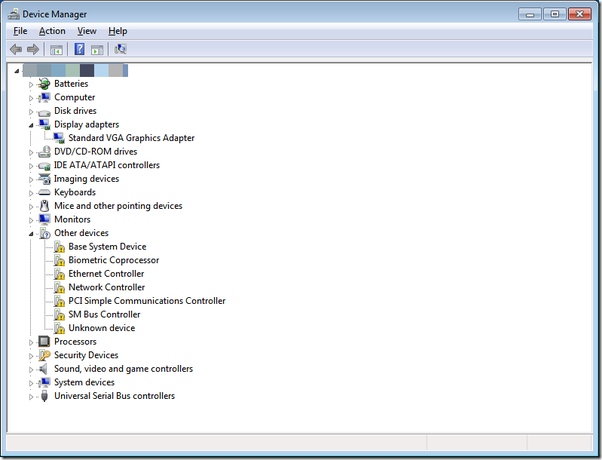
In the Device Manager, you may come across a warning with yellow exclamation indicating an unknown device, type or class of device. To resolve this, follow the instructions below.
- Right-click on the warning icon and select “Properties”.
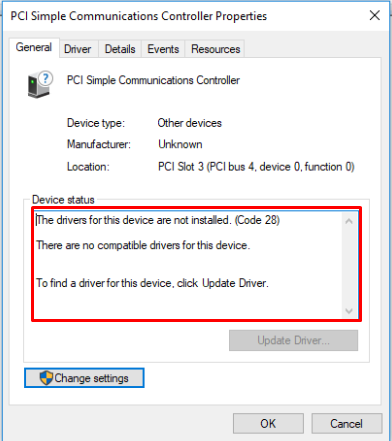
Note: If the warning error is related to a driver issue, you will see the text in the “Device status” as seen below:
Advanced troubleshooting
Sometimes the issue persists even after updating your OS, simply because there is no suitable driver in the Windows update database.
- Identify the vendor. On the Device Manager, right-click on the driver and select “Properties”.
- Select the “Details” tab.
- Under “Property”, click the dropdown box and select “Hardware Ids”.
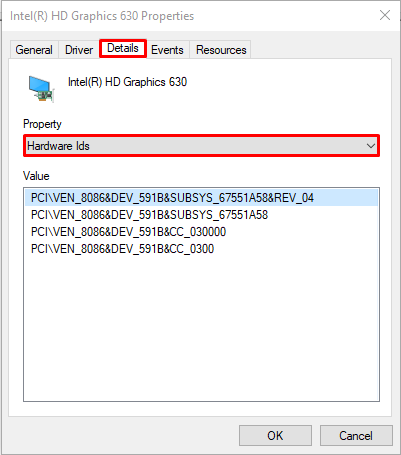
Note: Below is some of the commonly known vendor and their associated IDs.
|
PCI\VEN |
Vendor |
USB\VID |
Vendor |
|---|---|---|---|
|
8086 |
Intel |
1532 |
Razer |
|
10EC |
Realtek Semiconductor |
|
|
|
10DE |
NVIDIA |
|
|
- Identify the hardware. DEV_XXXX uniquely identifies the hardware, however, there isn’t a straightforward method to look up what this device is.
- Take note of the DEV_XXXX and reach out to Razer Support.

