Ensure your headset is sufficiently charged before connecting it to your device.
Select your preferred connection mode
2.4 GHz mode
-
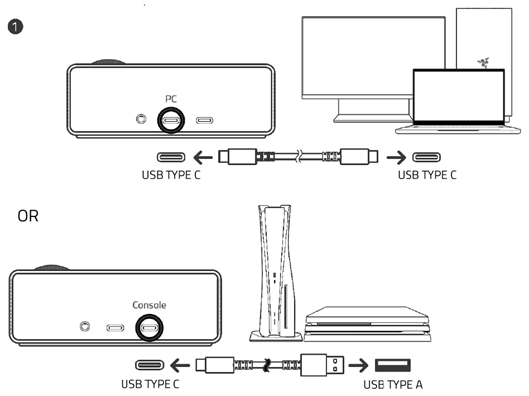
Connect the OLED Control Hub to your device via the appropriate input port using the provided USB cable.
-
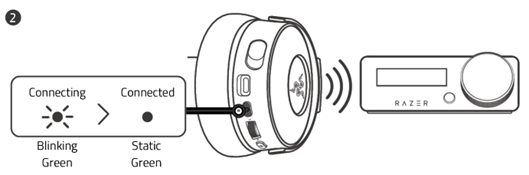
Press and hold the power button on your headset for two seconds to turn it on. It should automatically connect to the OLED Control Hub.
Note: The status indicator will blink green while connecting. It will then switch to static green once the connection is established.
-
Configure Razer Kraken V4 Pro as the default output and input device.
Setup for PC:
-
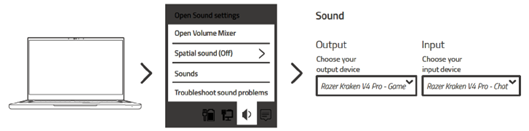
Right-click the sound icon in the system tray and select “Open Sound settings”.
-
Set “Razer Kraken V4 Pro” as the default output and input device.
Setup for consoles:
Note: Check your console’s manual for detailed instructions.
-
Go to the sound or audio settings of your console.
-
Set “Razer Kraken V4 Pro” as the default output (audio out) and input (microphone) device.
-
Bluetooth mode
-
Press and hold the power button on your headset for two seconds to turn it on.
-
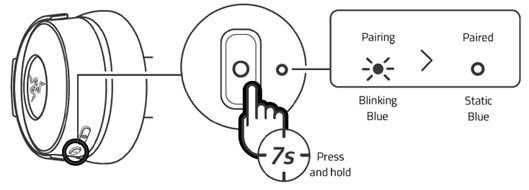
Press the multifunction button twice to activate Bluetooth pairing mode.
Note: The status indicator will blink blue while connecting. It will then switch to static blue once the connection is established.
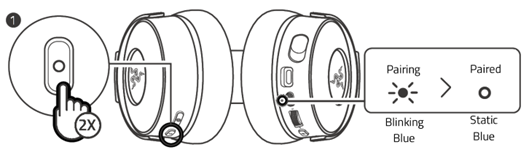
-
Enable Bluetooth on your device then select “Razer Kraken V4 Pro BT” from the list of found devices.
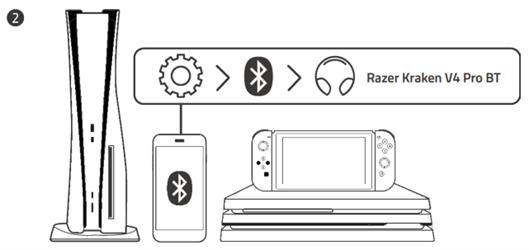
To re-pair your headset, press and hold the multifunction button for seven seconds.