

Tips to help you get started
How To
How do I use the AI Prompt Master?
Important: Ensure your device supports this feature. See AI Prompt Master supported devices for more details.
- Install and run Razer Synapse 4.
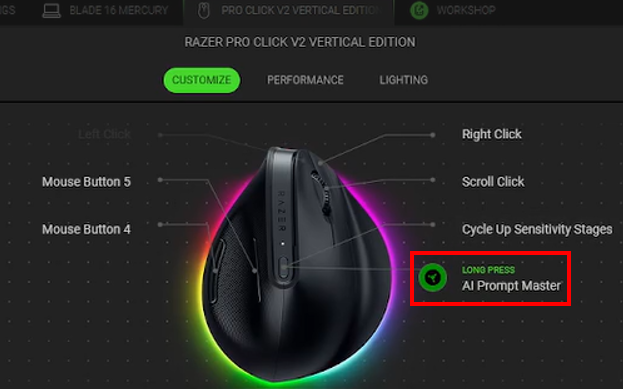
- Assign AI Prompt Master to your mouse button.
- Press and hold the mouse button that you assigned the AI Prompt Master to.
- Once the AI PROMPT MASTER dialog pops up, customize and provide your input.
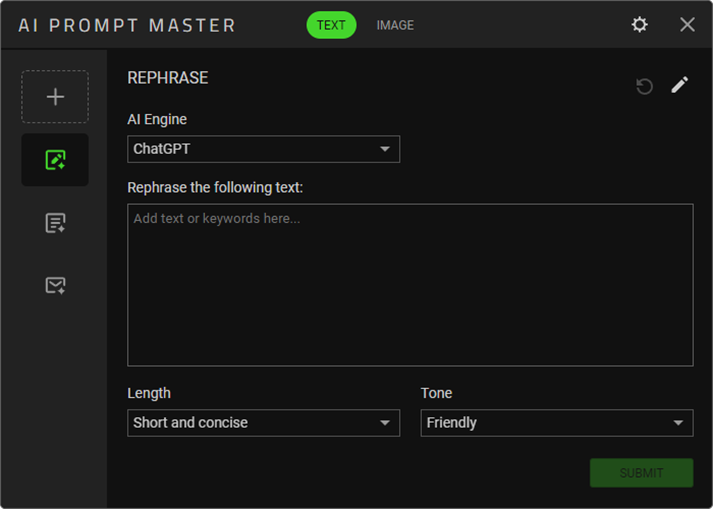
See the answers below for more details.
How do I disable the AI Prompt Master key?
- Launch Razer Synapse 4.
- Click on the AI Prompt Master button.
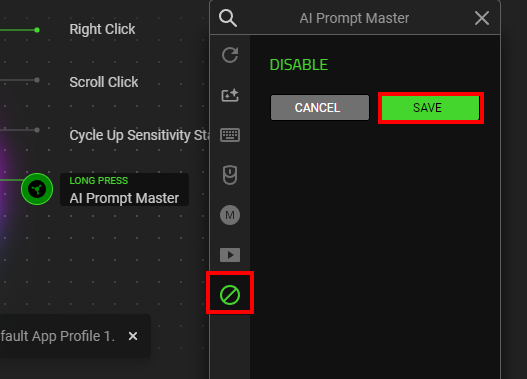
- Click the DISABLE button then click “SAVE”.
How do I use the Preselected Text function?
Highlight the desired text and open AI Prompt Master. The text will be inserted automatically, eliminating the need for manual copying or pasting.
General Information
What is the AI Prompt Master and how does it work?
The Razer’s AI Prompt Master offers immediate access to the third-party AI services, streamlining and speeding up the prompt creation process. Quickly rephrase, summarize, and craft a personalized prompt with minimal disruption to your workflow.
Can I use the AI Prompt Master without Razer Synapse 4?
No, this feature requires Razer Synapse 4 to access.
What Razer devices support AI Prompt Master?
Below is a list of Razer AI Prompt Master supported devices.
See the answer below for more details.
What is the supported AI engine available in the AI Prompt Master?
The AI Prompt Master currently comes with ChatGPT and Microsoft Copilot AI Engine.
Do I need to pay to use the AI Prompt Master?
No, the AI Prompt Master is free to use so long as your device supports this function.
Do I need a paid AI engine to use this?
No, this AI Prompt Builder works with any account, free or paid. However, if you have a paid plan, using this app will contribute to your usage limits. Refer to the third-party AI services page that you are using for more information.

