
Applicable models:
Restoring your phone to its factory settings erases all the data stored on the device and returns all settings to their defaults. A factory reset or hard reset can help fix persistent problems with your phone's functions. Follow the steps below to perform a factory reset or hard reset on your Razer Phone.
Note: Back up your data before you begin, because a factory reset deletes all data and settings on your Razer Phone. Data on your SIM card and SD card will not be affected. Also, ensure your phone's battery is sufficiently charged.
Select a reset method
Perform factory reset on Razer Phone
-
Go to Settings > System > Advanced > Reset options.

-
Tap “Erase all data (factory reset)”.

-
Tap “RESET PHONE”.

Note: Resetting your phone may take several minutes.
-
Once the "WELCOME" screen is displayed, your phone has finished its factory reset process.
-
Tap “GET STARTED” and follow the on-screen prompts to set up the Razer Phone.

Perform factory reset on Razer Phone 2
- Go to "Settings" > "System" > "Advanced" > "Reset options".

- Select “Erase all data (factory reset)”.

- Tap “RESET PHONE”.
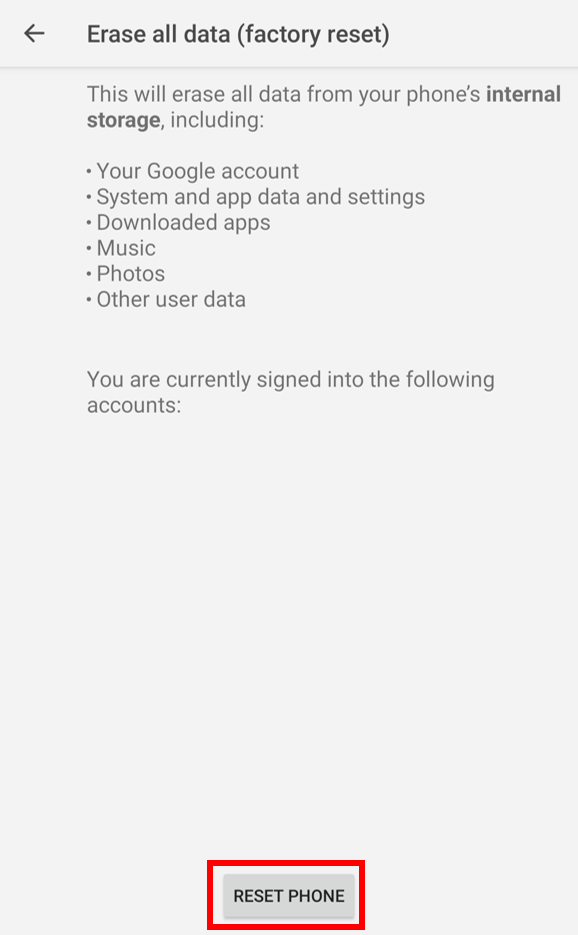
Note: Resetting your phone to its factory settings may take several minutes.
- Wait until the reset process is complete.
Perform hard reset on Razer Phone or Razer Phone 2
Note: Before you proceed, ensure the Razer Phone is up to date.
-
Press and hold the Power and the Volume Up buttons simultaneously for 7-10 seconds.


The Phone should reboot automatically.
-
Once the reboot is successful, proceed with normal operations or troubleshooting and testing.

