
Below are the steps to use OTF Macro Recording on a Razer keyboard.
Note: Make sure Razer Synapse is installed and running in the background before proceeding.
Press the macro record key combination to start recording (typically fn + F9). The Macro Recording Indicator will light on.

Type in the keys you want to record.
Press the macro record key combination again to stop the recording. The Macro Recording Indicator will start blinking.
Press the key where you want to bind your macro.
Note: Some Razer keyboards have extra keys intended for saving macros.

Your macro is automatically saved in Razer Synapse and can be modified there.
The Razer keyboard does not have any options to disable the delays in the on-the-fly macro recording. To ignore delays between recorded events, open Razer Synapse and record a macro with the "No Delay" setting selected in the "Record" dropdown menu.
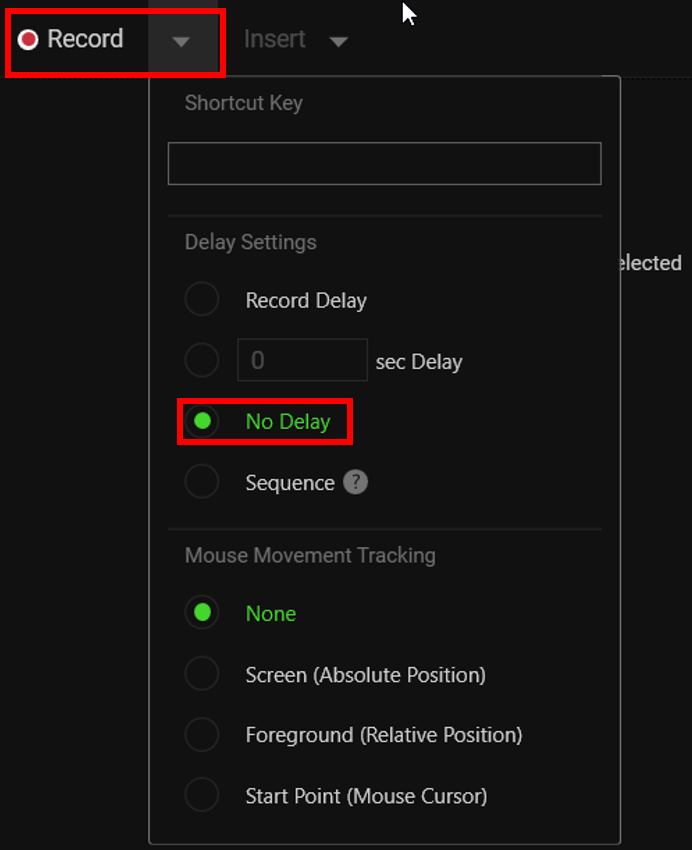
See the answer below for more details and instructions:

