
It is important to keep your Windows OS up to date to ensure that you have the latest software, driver, and security updates for your system.
Select Windows version
Windows 10
-
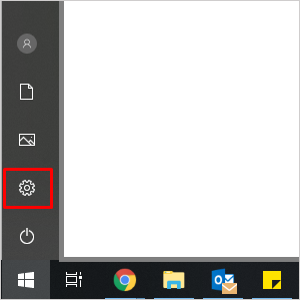
Click the "Start" button, then go to "Settings".
-
Select "Update & Security".

-
Under "Windows Update", click "Check for updates". Your system will prompt you of any missing updates or inform you if your device is currently up to date.

-
If there is an update available, click "Download and install".

-
After the updates have been downloaded, you will be prompted to restart your system to complete the installation.
Windows 11
-
Press the Windows button on your keyboard.
-
Select "Settings".

-
Select "Windows Update".
-
Under "Windows Update", click "Check for updates". Your system will prompt you of any missing updates or inform you if your device is currently up to date.

-
If there is an update available, click "Download and install".
-
Install optional updates.
-
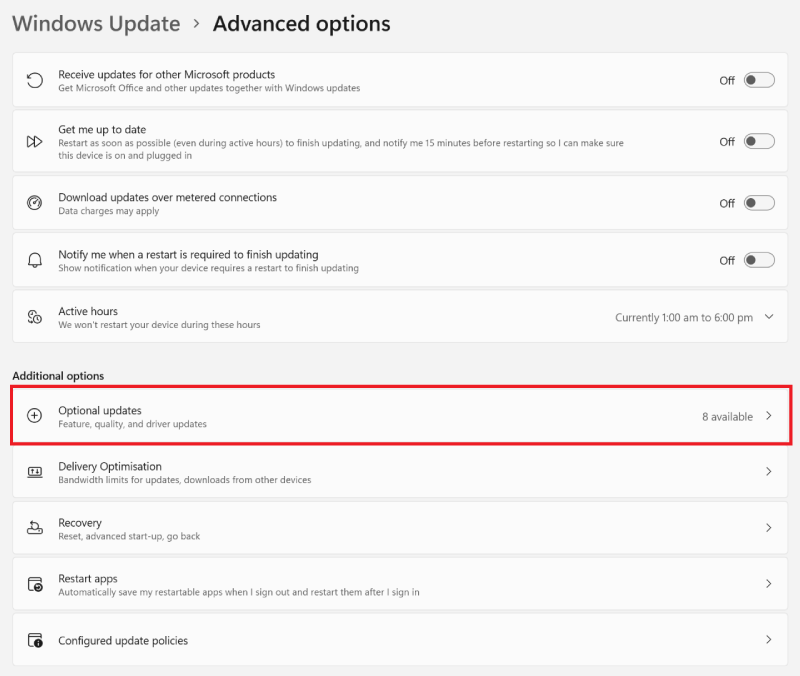
Select "Advanced options" under Windows Update.

-
Select "Optional updates".
-
Select all available updates and click "Download & install".

-
-
After the updates have been downloaded, you will be prompted to restart your system to complete the installation.
For more information, see Microsoft Update Windows.

