
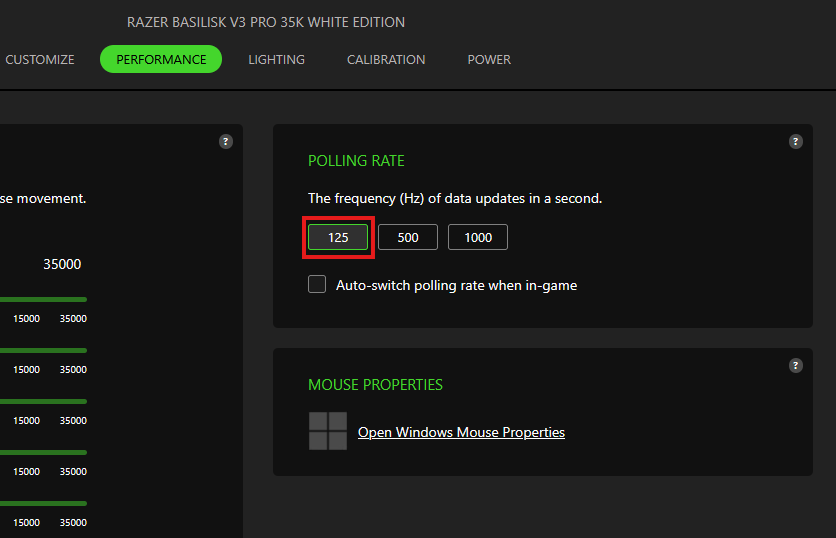
Ensure that the mouse Polling Rate is set to 125 Hz for Xbox One gaming.
Below is the current list of supported Razer mice:
- Razer Atheris
- Razer Basilisk
- Razer Boomslang 20th Anniversary Edition
- Razer Deathadder Elite
- Razer Deathadder V4 Pro
- Razer Lancehead
- Razer Lancehead Tournament Edition
- Razer Mamba Hyperflux
- Razer Naga Trinity
- Razer Mamba Elite
- Razer Mamba Wireless
- Razer Viper V4 Pro
Step-by-step process on how to set polling rate for the supported mice:
-
Start Razer Synapse.
-
Click on the mouse image under "DEVICES".
-
Take note of the selected profile.
-
Go to "PERFORMANCE".
-
Select the value "125" under "POLLING RATE".
-
Ensure the profile is still selected before disconnecting the mouse from the system.
-
For Hybrid Storage supported mouse, ensure that the Profile LED located under the device is showing as White after connected to Xbox One.


