
This issue could be due to a third-party app currently unsupported by the Razer Phone 2.
Note: Before proceeding to the troubleshooting steps, ensure the Razer Phone is up to date. To verify this, navigate to Settings > System > Advanced > System update > Check for update.
If the issue is not occuring using the native phone app, follow the steps below:
-
Disable Wi-Fi calling.
-
Select a different “Preferred Network” by going to Settings > Network & internet > Advanced.

-
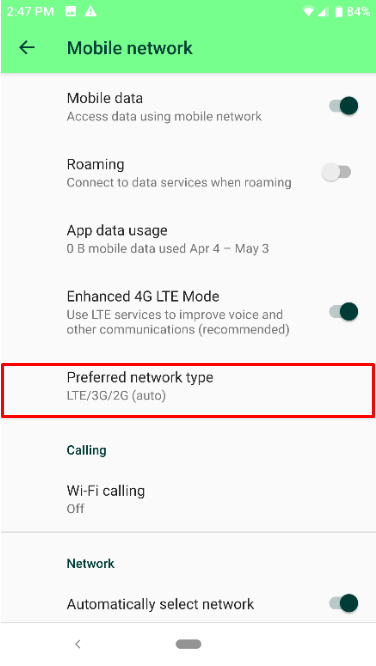
Tap “Preferred network type”.
-
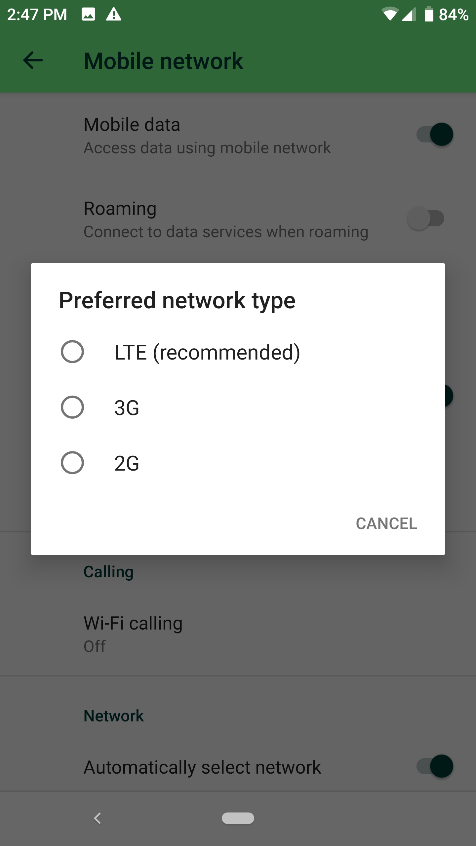
Switch between “LTE (recommended)”, “3G”, and “2G ” and verify if the issue persists each time you switch the network type.
-
Move to a location with a stronger signal.
-
Try inserting the SIM card to a different phone to verify that the SIM is not defective. If the issue persists, this is caused by a defective SIM card. In that case, contact your network or service provider.
-
If the SIM card works on a different mobile phone, test a SIM from a different mobile carrier and verify if the issue has been resolved.

