
To disconnect your Razer Blade from unwanted connections, such as Wi-Fi and Bluetooth, follow these steps:
For Wi-Fi
-
Click the wireless icon in the notification area found on the bottom-right section of your screen.
-
Select the network you're currently connected to.
-
Click the "Disconnect" button on the network connection.

For Bluetooth
-
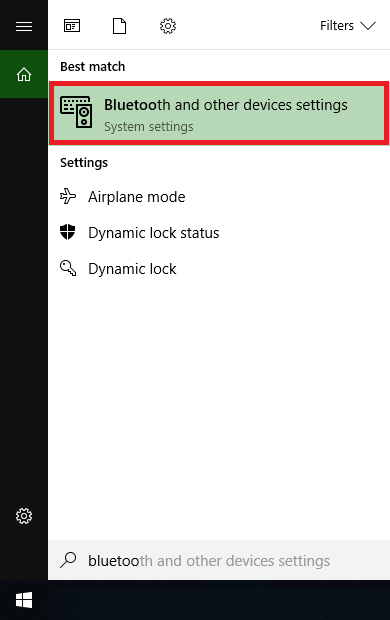
In the Start menu found in the bottom-left section of your screen, type and select "Bluetooth and other devices settings".
-
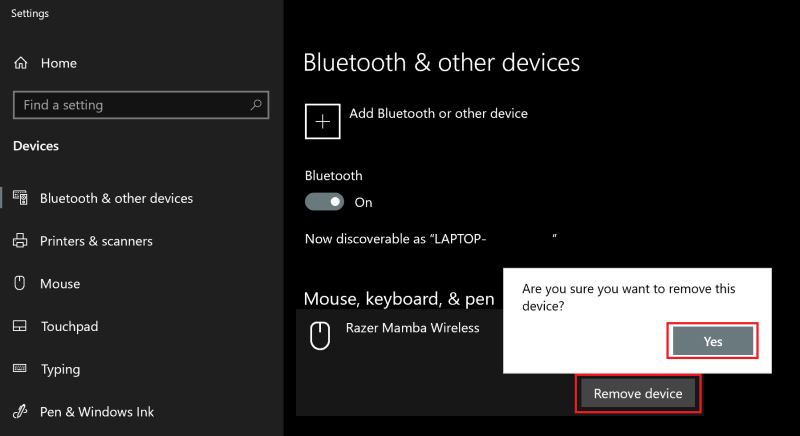
Select the Bluetooth device you want to remove.
-
Click the "Remove device" button.
-
Click the "Yes" button to confirm.
-
You may also turn off your Bluetooth by toggling it "Off".


