
Exporting and importing macros in Razer Synapse allows you to back up and transfer your macro configurations between devices.
You can view the video below for instructions or review a copy of the video transcript.
Important: Razer Synapse 3 macro files will not work with Razer Synapse 4 and vice versa.
Follow the detailed instructions below to export and import macros in Razer Synapse.
Select an action
Export macros to computer
-
Open Razer Synapse.
-
Go to the “MACRO” tab.
-
Find the macro you want to export under the “MACRO LIST”.
-
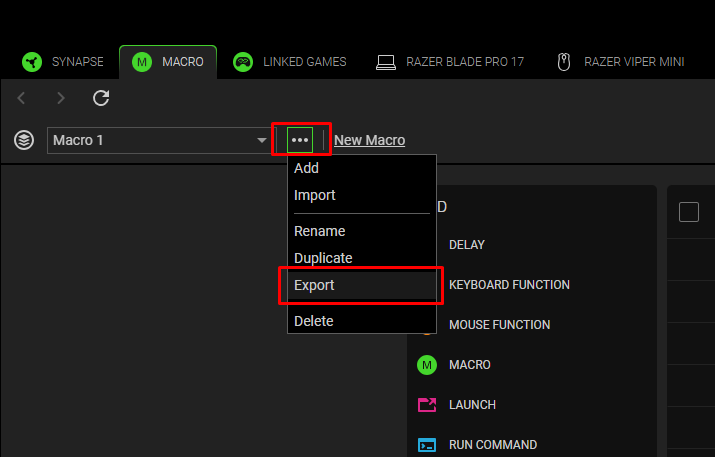
Click on the 3-dot icon next to the macro name and click “Export”.
-
Choose a location where you want to save the macro file.
-
Click “Save”.


Import macros from computer
-
Ensure you have access to exported or saved macro files on your computer.

-
Open Razer Synapse.
-
Go to the “MACRO” tab.
-
Click on the 3-dot icon next to the macro name and click “Import”.

-
Browse to the location of your macro files and select the macro you want to import.
-
Click “Open”.

The selected macro is now on your “MACRO LIST”, ready for key binding.

Assign macros
See the answers below to learn about assigning macros.

