How to set up the Razer Atrox for Xbox One

| Answer ID: 1885
This is a guide on properly setting up your Razer Atrox | RZ06-0073x.

The following steps will guide you in setting up your Razer Atrox on Xbox One:


  1. Press the Compartment button to unlock the lid.

Illustration showing the compartment button on the Razer Atrox

  1. Lift the lid to access the multipurpose compartment.

Illustration showing the compartment lid on the Razer Atrox being lifted

  1. Take out the Detachable Cable with the attached Breakaway Cable.

Illustration showing the detachable cable on the Razer Atrox from its compartment

  1. Place both hands on the edge of the lid away from the center and push down to close and lock the lid.

Illustration showing both hands on the edge of the lid on the Razer Atrox

  1. Ensure the marking is facing up when inserting the cable.
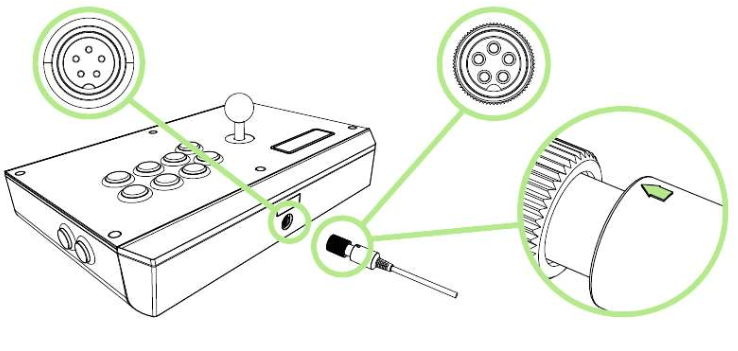
Illustration showing the marking facing up on the cable

  1. Rotate the tip clockwise until the detachable cable is firmly connected to the Razer Atrox for Xbox One.

Illustration showing connecting the cable in a clockwise direction on the Razer Atrox

  1. Connect the Razer Atrox for Xbox One to your Xbox One video game console.

Illustration showing the Razer Atrox connecting to the Xbox One

  1. To remove the detachable cable, rotate the tip counterclockwise to loosen, and then gently pull the cable. 
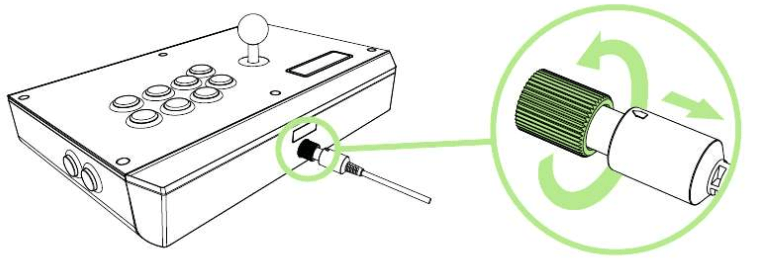
Illustration showing the cable detaching from the Razer Atrox in a counterclockwise direction

Is this answer helpful?