
An outdated firmware can cause the mouse cursor freezing issue and updating the firmware can quickly fix it. Follow the steps below.
Note: Make sure to close Razer Synapse first before you proceed.
-
Click on the hidden icons button on the system tray at the bottom right corner of your screen.
-
Right-click on the Razer Synapse logo.
-
Select the “Exit Synapse” option.
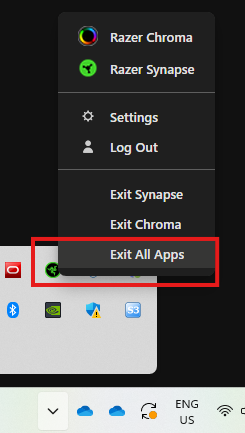
Note: If you do not close Razer Synapse, an error message will prompt you to do so when you try to open the updated firmware.

-
Download the updated firmware.
-
Go to the “Downloads” folder.
-
Run the updater and follow the on-screen instructions for installation.


