
Most audio issues can easily be resolved using the “Windows Troubleshooter”. Simply right-click the “Sound” icon on your System Tray at the bottom right side of your desktop and select “Troubleshoot sound problems”. Windows will detect the problem you are currently experiencing and provide steps you can follow to resolve the issue.
Note: Ensure you have installed all the latest Microsoft® Windows Operating Systems and Security Updates.
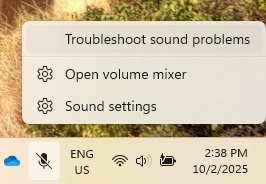
If Windows Troubleshooter is unable to resolve the issue, please proceed with following troubleshooting steps:
-
Check if there are no physical damages on your speakers.
-
Check if the audio is muted. If the speakers are muted, unmute the speakers and/or increase the volume.
-
Check if the issue is caused by the speaker itself or a corrupted driver by doing the following:
-
Playing a different audio file. Use a local audio file to ensure that this is not an internet issue.
-
Use an external audio device.
-
-
If the issue persists, update your audio drivers.
-
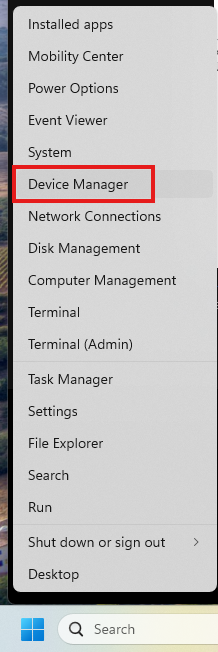
Right-click “Start” and go to “Device Manager”.
-
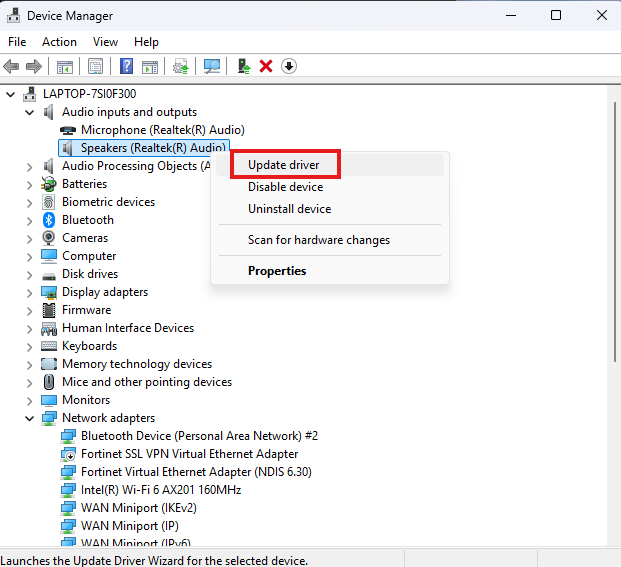
Expand “Audio inputs and outputs” and right-click on your audio driver. Click “Update driver”.
-
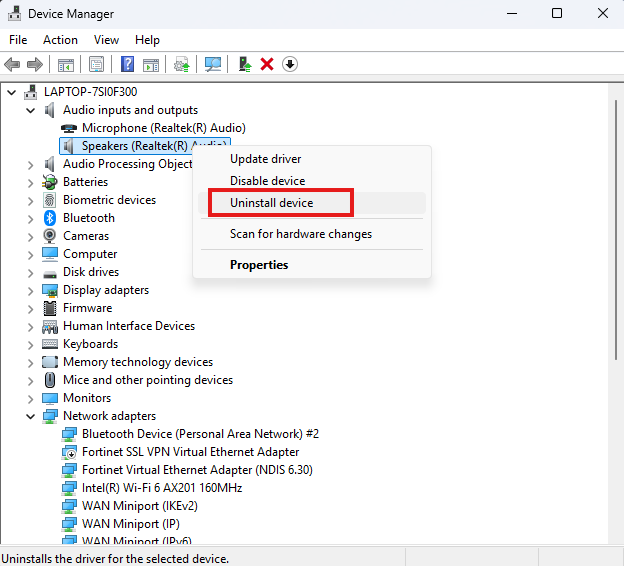
If the issue is not resolved, reinstall your audio drivers. On the Device Manager, right-click on your Audio drivers and select “Uninstall device”.
-
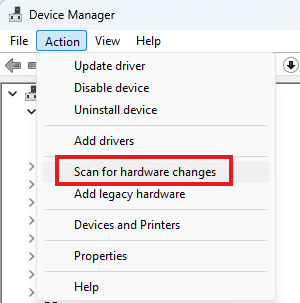
After uninstallation is done, click “Action” on the top menu and click “Scan for hardware changes”. Your Blade will detect your audio device and install the necessary audio drivers. Proceed with installing the drivers.
-
If these steps did not resolve the problem and you have determined that the issue is with the Razer Blade, consider doing a system recovery or factory reset.
-

