
Depending on the mouse, the sensitivity rate can be as low as 100 DPI and be as high as 26,000 DPI.
Follow the steps below to adjust the DPI manually.
-
Check the DPI buttons at the back of the scroll wheel.
-
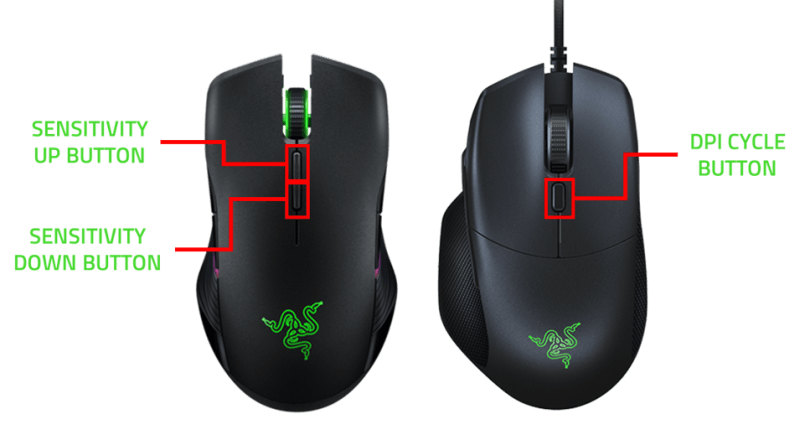
Increase, decrease, or cycle through the DPI stages using the sensitivity buttons of your mouse:
For dual sensitivity buttons:
-
The first button from the scroll increases the DPI upon click. Click this repeatedly until you reach the sensitivity your desire.
-
The second button from the scroll decreases the DPI upon click. Click this alternately with the increase button to get the exact adjustment you want to achieve.
For single sensitivity buttons:
-
Click on the DPI cycle button repeatedly to cycle up until you reach the desired sensitivity.
-
If Razer Synapse is launched on your computer, it will notify your DPI level on the bottom-right part of your screen.

To adjust the DPI setting on a Razer mouse through Razer Synapse, see How to adjust the DPI setting on a Razer mouse through Razer Synapse for more details.

