
Use this guide to identify which Thunderbolt™ or USB4 ports on your Razer laptop support docking stations.
Note: Connection to a Thunderbolt™ 5 port is required for optimal performance.
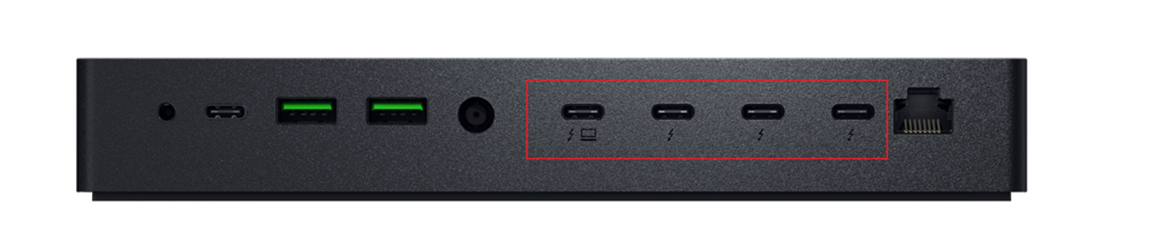
The following non-Razer systems are also compatible with the Razer Thunderbolt™ 5 Dock Chroma:
-
Windows 10 PCs with a Thunderbolt™ 5 or Thunderbolt™ 4 port
-
Mac systems with an Apple M1 processor*
* On M1 MacBooks, only one video output is supported.
Compatible Razer Blade models are listed below. Refer to your model's product manual for supported port locations.
Razer Blade 18
Model
Supported Ports for Docking
Razer Blade 18" (2025) | RZ09-0529x
4 × Thunderbolt™ 4 or 4 × Thunderbolt™ 5
Razer Blade 18" (2024) | RZ09-0509x
4 × Thunderbolt™ 4 or 4 × Thunderbolt™ 5
Razer Blade 18" (2023) | RZ09-0484x
4 × Thunderbolt™ 4
Razer Blade 17
Model
Supported Ports for Docking
Razer Blade 17" (2022) | RZ09-0423x
4 × Thunderbolt™ 4
Razer Blade 16
Model
Supported Ports for Docking
Razer Blade 16" (2025) | RZ09-0528x
4 × USB4
Razer Blade 16" (2024) | RZ09-0510x
4 × Thunderbolt™ 4
Razer Blade 16" (2023) | RZ09-0483x
4 × Thunderbolt™ 4
Razer Blade 15
Model
Supported Ports for Docking
Razer Blade 15" (2023) | RZ09-0485x
4 × Thunderbolt™ 4
Razer Blade 15" (2022) | RZ09-0421x
4 × Thunderbolt™ 4
Razer Blade 14
Model
Supported Ports for Docking
Razer Blade 14" (2025) | RZ09-0530x
4 × USB4
Razer Blade 14" (2024) | RZ09-0508x
4 × USB4
Razer Blade 14" (2023) | RZ09-0482x
4 × USB4

