
Applicable models:
- Razer Barracuda
- Razer Barracuda Pro
- Razer Barracuda X (2022)
- Razer Barracuda X Chroma
- Razer BlackShark V2 HyperSpeed
- Razer BlackShark V2 Pro (2023)
- Razer BlackShark V3
- Razer BlackShark V3 Pro
- Razer BlackShark V3 X HyperSpeed
- Razer Kaira for Xbox
- Razer Kaira HyperSpeed (PS5)
- Razer Kaira HyperSpeed (Xbox)
- Razer Kaira Pro for PS5
- Razer Kaira Pro for Xbox
- Razer Kaira Pro HyperSpeed (PS5)
The SmartSwitch button on your Razer headset allows you to cycle through the following connection options:
-
Equalizer (EQ) Presets
-
2.4 GHz Mode
-
Bluetooth Mode
-
Simultaneous Audio Mode
You can view the video below for instructions or review a copy of the video transcript.
Note: The Simultaneous Audio feature is currently available in the Razer BlackShark V3 Pro.
-
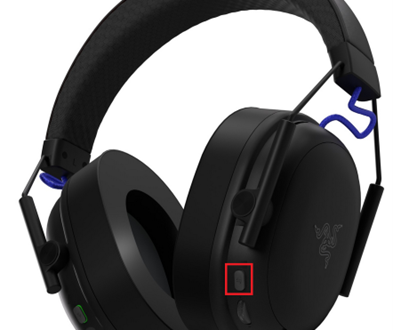
Locate the SmartSwitch button on your Razer headset.
-
Press the SmartSwitch button once to cycle the default Equalizer (EQ) presets.
Note: Equalizer (EQ) Presets are customizable on Razer Synapse or the Razer Audio App.
-
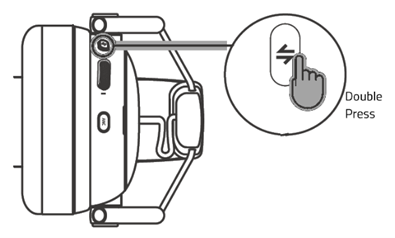
Press the SmartSwitch button twice to cycle through HyperSpeed, Bluetooth, or Simultaneous Audio modes.
You can now switch your Razer headset connection modes using SmartSwitch.

