

The Razer Ifrit is a lightweight and discreet in-ear headset and broadcaster-grade mic for low-profile streaming that’s compatible with PC, mobile phone, or console. Coupled with the Razer USB Audio Enhancer, the pair delivers improved recording and audio quality with a flat frequency response rate. The enhancer also allows up to two devices to be plugged in at the same time for easy co-streaming or shout-casting.

Device Layout

- Adjustable microphone with mic foam cover
- Earpiece with removable bi-flange eartips
- Magnetic clip-on bezel
- Ergonomic earhook neckband
- 3.5 mm audio + mic jack
- Status indicator
- Mic mute button
- Audio control / Audio mute button
- Audio + mic headset ports
- Three interchangeable eartips in varying sizes
Technical Specifications
| Category | Specification |
|---|---|
|
Connectivity |
3.5 mm analog |
|
Audio |
Stereo |
|
Earphones |
Frequency response: F0 – 20 kHz |
|
Impedance: 32 Ω ± 15% @ 1 kHz |
|
|
SPL: 102 ±3 DB |
|
|
Diameter: Ø10 mm |
|
|
Nominal/Max input power: 10 mW / 20 mW |
|
|
Type: Dynamic speaker |
|
|
Microphone |
Frequency Response: 100 – 10,000 Hz |
|
Sensitivity @ 1 kHz: -41 dB ± 3 dB |
|
|
Type: Ø9.7 mm, ECM unidirectional |
|
|
Polar Pattern: Cardioid |
|
|
USB Sound Enhancer Microphone |
Sample Rate: 44.1 kHz/48 kHz selectable via computer setting |
|
Bitrate: 16 bit |
|
|
Frequency response: 20 – 20,000 Hz |
How To
How do I connect a 3.5 mm Razer headset to a desktop, laptop, or mobile device?
Plug the 3.5 mm audio connector directly into the device's 3.5 mm audio port. See the answer below for more details.
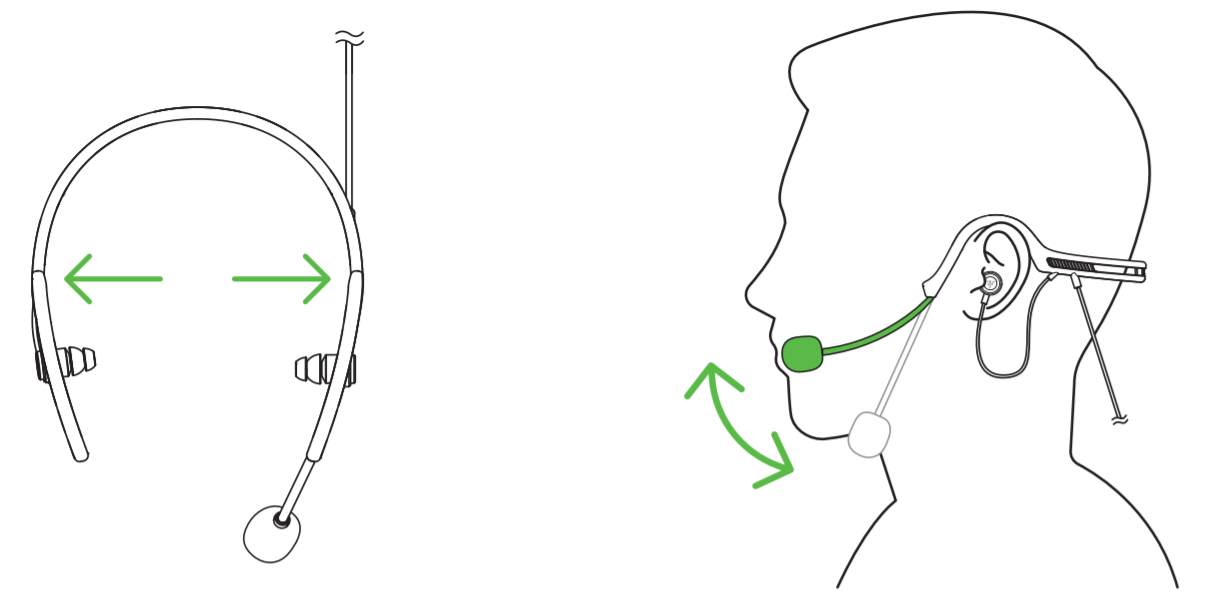
How do I wear the Razer Ifrit headset?
- Select the correct size ear tips from the three available interchangeable ear-tips that are provided with the Razer Ifrit.
- Position the mic boom on your left side.
- Gently stretch the Ifrit's neckband across the lower backside of your head
- Bring the 2 hooks over the ears.
- Place the ear-tips into your ears, ensuring they are properly seated.
How do I use THX Spatial Audio?
After purchasing THX Spatial Audio, an activation code will be sent to your email.
See the answer below for more details.
How do I maintain clear audio and avoid feedback on my Razer headset?
- Do not set the sensitivity level to the maximum or use a boost.
- Disable the "Listen to this device" feature.
- Use only one voice chat application while in-game.
See the answer below for more details.
How do I optimize audio performance on my Razer headset?
- Remove dirt or debris in audio ports and on the audio jack.
- Properly plug in the audio jack. Do not use hub connections for USB-type headsets.
- Operate wireless headsets within the maximum wireless range.
See the answers below if audio issues persist.
How do I optimize microphone performance on my Razer headset?
- Put the mic diaphragm in front and the air vent facing away from your mouth.
- Turn on mic access on the selected app.
- Set the device as a Default Recording Device.
- Adjust mic levels in Windows settings.
You can view the video below for instructions or review a copy of the video transcript.
See the answer below for more details.
How do I improve sound clarity by managing echo and feedback on my Razer headset?
- Do not set the sensitivity level to the maximum or use a boost.
- Disable the "Listen to this device" feature.
- Use only one voice chat application while in-game.
See the answer below for more details.
How do I clean my Razer headset?
-
Use a lint-free, microfiber cloth and lightly wet it with an alcohol-based cleaning solution (at least 70% isopropyl alcohol).
-
Never use solvents such as thinner, benzene, or alcohol to avoid damaging the surface.
See the answer below for more details.
General Information
Can I adjust the Razer Ifrit to fit my head?
Stretch the Ifrit's neckband gently apart before placing the neckband’s ear hooks over your ears. You may then bend the headset’s microphone until it is in front of your mouth. You can make slight adjustments with the Ifrit by gently bending the Ifrit to suit your head shape. However, this is not advised as bending the Ifrit band might cause permanent damage to the product.
| Documentation | Language |
|---|---|
| User Guide (English) | English |
| User Guide (Spanish) | español |
| User Guide (French) | français |
| User Guide (German) | Deutsche |
| User Guide (Portuguese-Brazilian) | português |
| User Guide (Russian) | русский |
| User Guide (Traditional Chinese) | 繁體中文 |
| User Guide (Simplified Chinese) | 简体中文 |
| User Guide (Korean) | 한국어 |
| User Guide (Japanese) | 日本語 |
| User Guide (Arabic) | اَلْعَرَبِيَّةُ |
Please see our warranty policy for a complete review of our warranty policy.
You are eligible for Limited Warranty support for the following periods of time commencing upon the date of retail purchase of your Product (Warranty Period).
| Product | Warranty Period |
|---|---|
| 2021 and Older Model Laptops | 1 yeara |
| 2022 and Newer Model Laptops | 1 yeara 2-year limited battery warrantya |
| Razer Viper Mini Signature Edition | 3 year |
| Razer Phone and Phone Accessories | 1 year |
| Razer Edge Gaming Handhelds | 1 year |
| Razer Mice | 2 years |
| Razer Keyboards and Keypads | 2 yearsb |
| Razer Huntsman Signature Edition | 5 years |
| Razer Headsets, Earphones and Earbuds | 2 yearsb |
| Razer Wireless Mouse and Mat Bundles | 2 yearsb |
| Razer Mouse Mats | 1 yearc |
| Razer Speaker Systems and Broadcaster Devices | 1 year |
| Razer Controllers and Chargers | 1 year |
| Razer Routers (except Singtel) | 1 year |
| Razer Routers (Singtel) | 2 years |
| Razer Monitors | 1 year |
| Smart Watches and Eyewear | 2 years |
| Razer Case Fans | 2 years |
| Razer Liquid Cooling | 2 years |
| Razer Power Supplies | 5 years |
| Razer Fan and RGB Controllers | 2 years |
| Razer Cases | 1 year |
| Razer System Accessories | 1 year |
| Razer Docks | 1 year |
| Wearable Air Purifiers | 1 year |
| Razer Gaming Accessories | 1 yearc |
| Razer Rechargeable Batteries for Wireless Devices | 1 yeard |
| Razer Gaming Chairs | 3 yearse |
| Chair Frame, mechanisms and armrests | Up to 5 years |
| Mesh backing and seat pan | Up to 1 year |
All new Products will have the Warranty Periods listed above, subject to applicable local law. Certain "end of life", sell out or discontinued Products may have a shorter Warranty Period; this will be clearly marked at the time of purchase and the given Warranty Period will be stated at that time. Refurbished Products purchased from Razer.com will have the lesser of a 1 year warranty period or the warranty period as stated above. Refurbished products not purchased from Razer.com will have a 90 day warranty period. If you are uncertain whether your Product is eligible for Limited Warranty support, please contact our support team for clarification.
Please note that third-party products may be covered by the product manufacturer's warranty and these warranty terms are exclusively provided by the product manufacturer. Razer does not offer a warranty for third-party products. If you need product or warranty support with your third-party product, please contact the product manufacturer. Please consult the product documentation provided by the product manufacturer for details.
If you are uncertain whether your Product is eligible for Limited Warranty support, please contact our support team for clarification.
[a] If you are a customer outside of the U.S. and have validly purchased a Razer Extended Warranty for your product, the Warranty Period shall be extended for another one (1) year period, to be a total of two (2) years commencing upon the date of retail purchase of your Razer Product. The Razer Extended Warranty does not apply to batteries. Aside from the change to Warranty Period, the Razer Extended Warranty does not alter any other terms and conditions of the Limited Warranty.
[b] Products purchased prior to October 1st, 2018 maintain the original 1 year warranty (keyboards with mechanical switches maintain original 2 year warranty).
[c] Warranty period for Razer Firefly HyperFlux is 2 years.
[d] Products purchased prior to October 1st, 2018 maintain the original 6 month warranty.
[e] Limited Warranty: The Razer Iskur is free from defects in workmanship, materials and construction for three years from the date of purchase. In the event that a defect is found, the manufacturer will either repair or replace the defective item, at its discretion. Exclusions and Limitations: This Limited Warranty does not cover cosmetic damage, minor cosmetic abnormalities and normal wear and tear, including without limitation scratches, dents, discoloration and tears in the head pillow, seat cushion, PU leather, Armrest and stitches of the upholstery.

