
Stream and capture all your incredible gaming experiences like a pro with the Razer Ripsaw Game Capture Card. With high-definition 1080p video capture at up to 60 frames per second, over USB 3.0, your audience is assured the smoothest streaming performance ever. Razer Ripsaw also comes with a second mix-in channel for mic or music for a more layered audio production. Compatible with PC, Razer Forge TV, PS4, Xbox One, Wii U, and more.
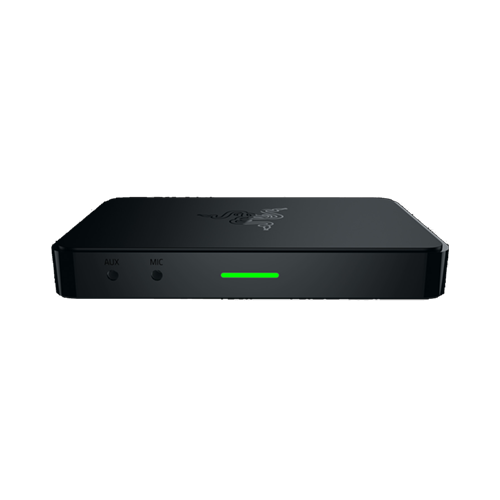
Device Layout

- USB 3.0 input port
- Component input port
- HDMI input port
- HDMI passthrough port
- Audio auxiliary input port
- Microphone input port
- Status indicator
- USB 3.0 cable
- HDMI cable
- Component AV cable
- Component AV multi cable
- 3.5 mm audio cable
Full Technical Specifications
| Category | Specification |
|---|---|
|
Interface |
USB 3.0 |
|
Video input |
Digital – HDMI Analog – Component |
|
Audio input |
Digital – HDMI Analog – RCA L/R |
|
Audio mix-in input |
3.5 mm mic-in 3.5 mm aux-in |
|
Video output |
HDMI (Pass-through from HDMI and Component input) |
|
Max video capture resolution |
Uncompressed 1080p at 60 FPS |
|
Supported video resolutions |
|
How To
How do I set up the Razer capture card to work with my high refresh rate gaming monitor?
There is a method to ensure a full high refresh rate gaming performance while allowing the Razer capture card to stream at 60 Hz preventing screen tearing.
See the answer below for more details.
How do I enable Nintendo Switch to be captured on my Razer capture card?
- Go to OBS Studio settings.
- Right-click the Razer capture card "Scene" and change video settings from "default resolution" to "Custom".
How do I mix audio inputs in stream or recording using Razer capture card and OBS?
- Open OBS Studio.
- Add an audio input device under “Sources”.
- Select your device from the dropdown list and click “OK”.
- Adjust the audio to your desired level using the sliders under “Audio Mixer”.
You can view the video below for instructions or review a copy of the video transcript.
See the answer below for more details.
How do I stream audio from my game to my computer while also listening through my headset?
Use a digital audio splitter like Voicemeeter to send audio to both your Razer capture card and headset or speakers.
How do I clean the Razer capture card?
- Unplug all connections and switch off your device.
- Wipe the surface of your device using a lint-free microfiber cloth.
See the answer below for more details.
General Information
| Documentation | Language |
|---|---|
| User Guide (English) | English |
Please see our warranty policy for a complete review of our warranty policy.
You are eligible for Limited Warranty support for the following periods of time commencing upon the date of retail purchase of your Product (Warranty Period).
| Product | Warranty Period |
|---|---|
| 2021 and Older Model Laptops | 1 yeara |
| 2022 and Newer Model Laptops | 1 yeara 2-year limited battery warrantya |
| Razer Viper Mini Signature Edition | 3 year |
| Razer Phone and Phone Accessories | 1 year |
| Razer Edge Gaming Handhelds | 1 year |
| Razer Mice | 2 years |
| Razer Keyboards and Keypads | 2 yearsb |
| Razer Huntsman Signature Edition | 5 years |
| Razer Headsets, Earphones and Earbuds | 2 yearsb |
| Razer Wireless Mouse and Mat Bundles | 2 yearsb |
| Razer Mouse Mats | 1 yearc |
| Razer Speaker Systems and Broadcaster Devices | 1 year |
| Razer Controllers and Chargers | 1 year |
| Razer Routers (except Singtel) | 1 year |
| Razer Routers (Singtel) | 2 years |
| Razer Monitors | 1 year |
| Smart Watches and Eyewear | 2 years |
| Razer Case Fans | 2 years |
| Razer Liquid Cooling | 2 years |
| Razer Power Supplies | 5 years |
| Razer Fan and RGB Controllers | 2 years |
| Razer Cases | 1 year |
| Razer System Accessories | 1 year |
| Razer Docks | 1 year |
| Wearable Air Purifiers | 1 year |
| Razer Gaming Accessories | 1 yearc |
| Razer Rechargeable Batteries for Wireless Devices | 1 yeard |
| Razer Gaming Chairs | 3 yearse |
| Chair Frame, mechanisms and armrests | Up to 5 years |
| Mesh backing and seat pan | Up to 1 year |
All new Products will have the Warranty Periods listed above, subject to applicable local law. Certain "end of life", sell out or discontinued Products may have a shorter Warranty Period; this will be clearly marked at the time of purchase and the given Warranty Period will be stated at that time. Refurbished Products purchased from Razer.com will have the lesser of a 1 year warranty period or the warranty period as stated above. Refurbished products not purchased from Razer.com will have a 90 day warranty period. If you are uncertain whether your Product is eligible for Limited Warranty support, please contact our support team for clarification.
Please note that third-party products may be covered by the product manufacturer's warranty and these warranty terms are exclusively provided by the product manufacturer. Razer does not offer a warranty for third-party products. If you need product or warranty support with your third-party product, please contact the product manufacturer. Please consult the product documentation provided by the product manufacturer for details.
If you are uncertain whether your Product is eligible for Limited Warranty support, please contact our support team for clarification.
Warranty Footnotes
- [a] If you are a customer outside of the U.S. and have validly purchased a Razer Extended Warranty for your product, the Warranty Period shall be extended for another one (1) year period, to be a total of two (2) years commencing upon the date of retail purchase of your Razer Product. The Razer Extended Warranty does not apply to batteries. Aside from the change to Warranty Period, the Razer Extended Warranty does not alter any other terms and conditions of the Limited Warranty.
- [b] Products purchased prior to October 1st, 2018 maintain the original 1 year warranty (keyboards with mechanical switches maintain original 2 year warranty).
- [c] Warranty period for Razer Firefly HyperFlux is 2 years.
- [d] Products purchased prior to October 1st, 2018 maintain the original 6 month warranty.
- [e] Limited Warranty: The Razer Iskur is free from defects in workmanship, materials and construction for three years from the date of purchase. In the event that a defect is found, the manufacturer will either repair or replace the defective item, at its discretion. Exclusions and Limitations: This Limited Warranty does not cover cosmetic damage, minor cosmetic abnormalities and normal wear and tear, including without limitation scratches, dents, discoloration and tears in the head pillow, seat cushion, PU leather, Armrest and stitches of the upholstery.

