

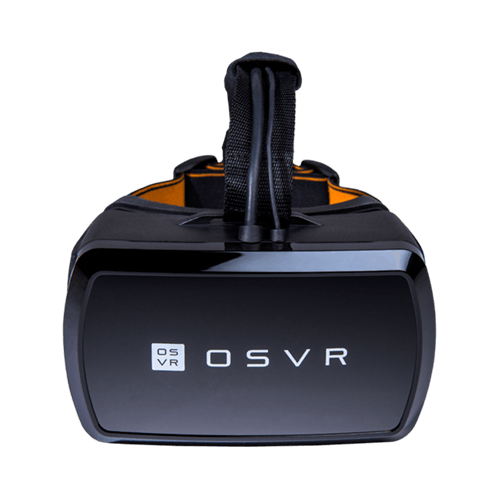
How To
How do I adjust the focus on the OSVR Hacker Development Kit?
The focal adjustments on the OSVR Hacker Development kit are for individuals who are long or short-sighted between +450 degrees to -200 degrees. In case this adjustment is outside the range of your eyesight, wear glasses or contact lenses. Loosen the straps on the HDK to accommodate your glasses and avoid damaging them. However, use without glasses is best as the use of glasses can result in the following:
- Non-optimal field of view
- Potential blurriness
- Potential to scratch the lenses.
How do I improve the display performance on my OSVR Hacker Development Kit?
Perform a power cycle. If this does not work, this could be due to the following:
- Content compatibility with Direct Mode: Direct mode allows all PCs using VR-ready GPUs to automatically play content on the VR headset without having to go through the regular Windows display configuration. It also improves performance. Some games support direct mode and some do not. If the game does not support direct mode, you will have to toggle direct mode off by going to the Windows search bar and typing in “Disable DirectMode”. You can enable direct mode again by typing “Enable DirectMode”. If support for direct mode is not clearly indicated for the game, play with this toggle to troubleshoot.
- Outdated GPU display drivers: Ensure that your graphics card drivers are fully updated.
How do I get my IR Positional Tracking Camera to work properly?
Ensure that the HDK is within line of sight and within 3 meters away or less.
How do I reduce latency on my OSVR Hacker Development Kit?
- Check if you are running the latest version of the OSVR server. Update if necessary.
- Check your PC Performance. Running a VR game can be very resource-intensive. If its minimum requirements are not met, it can result in bad performance.
- Close other applications that may be using your computer’s resources.
How do I achieve the ideal fit for my HDK headset?
- Ensure the HDK sits well on your face to avoid discomfort to the nose and cheekbones.
- Adjust the overhead strap so the weight resting on your cheekbones is at an ideal comfort level.
- Pull the cable running along the overhead strap through the rear IR box carefully If it is too short.
- Tighten the side straps to the point where you can move your head quickly from left to right without the HDK moving.
How do I maintain the HDK’s facemask?
- Rinse the bamboo charcoal microfiber facemask with cold water.
- Never use hot water as the heat can split the glue in the specialized microfiber foam layer. The facemask is attached by Velcro and is replaceable.
How do I clean the HDK’s lenses?
- Use the provided microfiber cloth for gentle cleaning of the lens surface to avoid hairline scratches.
- Use the provided air puffer to remove dust caught between the lenses and the display.
General Information
What is OSVR?
OSVR or Open Source Virtual Reality is a software platform that allows different types of VR technologies to reside in the same ecosystem. This means an end-to-end compatibility across different brands and devices, allowing you to use any OSVR-supported HMDs, controllers and other technologies together, giving you the ability to customize the combination of hardware you would like to use. It is like a software that allows you to customize your VR in the same way you can customize your PC.
OSVR is designed to support a wide variety of content from games and cinematic content to simulations, and marketing and advertising projects.
There are over 320 (and counting, as of May 2016) OSVR official supporters including companies like Intel, NVIDIA, Acer, Ubisoft, Gearbox Software and Legendary Studios. There are also VR dedicated partners like Leap Motion, Nod Labs, Perception Neuron, Jaunt and the like.
What do I need to run Virtual Reality hardware?
This depends on the type of HMD you want to use. Mobile HMDs are typically powered by smartphones unless they come with a built-in device. There are Mobile HMDs that only allow the use of smartphones of the same brand, and there are some that allow you to use a wide range of smartphones. As these are mainly powered by Android, you can gain access to VR content supporting smartphones on Google Play.
Tethered HMDs will require high powered machines to run. While system requirements vary depending on the specifications of the headset , and how intensive the content you are running, in general, a high-end computer system is required to run the hardware (as of May 2016 this would be PCs powered with at least a GTX 970 or equivalent, with at least i5-4590 equivalent, and 8gm of ram).
A high-end machine is required in order to render content in the stereoscopic format for use with VR headsets. Rendering content twice requires more processing power than it takes to render normal games and experiences. There are some HMDs like the OSVR HDK 1 that are designed to allow users to run it on a mid-tiered gaming PC and better.
Is OSVR the same as Oculus?
No. OSVR is open source while the Oculus platform is closed. This means that the hardware offerings and content available on the Oculus platform is proprietary and limited to within the brand itself. The OSVR ecosystem on the other is made up of different technologies from different brands.
Is the HDK intended for developers or consumers?
The HDK or Hacker Development Kit is a virtual reality HMD designed to bring the benefits of the OSVR ecosystem to fans of VR out of the box. Its support for the OSVR ecosystem also allows access to the growing range of VR controllers and technologies that support the ecosystem.
It is primarily for developers and enthusiasts. The HDK was designed to embody the vision of the software platform – to allow for unrestricted innovation for developers. It was created to address the needs of the emerging VR industry that requires flexibility and technology that is open to evolution. This is to help power innovation and allow owners of the hardware to access the latest technologies as soon as they are supported by the ecosystem.
There are two HDKs available:
- HDK 1 – Designed to provide all the essential technology you need to experience VR.
- HDK 2 – Designed to deliver mind-bending visual experiences with more advanced technology.
- HDK 1 – A PC running at least a GTX 660 and i5 3Ghz CPU or equivalent with a minimum of 8GB of RAM
- HDK 2 – A PC running at least a GTX 970 and i5 4590 or equivalent with a minimum of 8GB of RAM
Note: Optimal performance comes down to the system requirements for the content you are running.
Why is the HDK’s Belt Box important?
The belt box is used for optimal cable management to avoid accidental tripping, potential damage to cables due to pull and strain, and unintended disconnection during your VR experience.
What types of content can I run on the HDK or OSVR-compatible HMDs?
You can run VR content that supports the OSVR ecosystem or “Native OSVR Experiences”. Being open-source, we work with the community on providing access to other VR content platforms to add variety and flexibility to your content options. This includes SteamVR, emulators like Vireio Perception, and more.
Can I play Oculus or HTC Vive content on the HDK and OSVR-compatible HMDs?
No. Oculus based content are not supported. See the latest workarounds at https://www.reddit.com/r/OSVR/. We support Vive content through SteamVR. SteamVR is a platform that developers use to support the HTC Vive and through our plugin, their content will also be available on the OSVR ecosystem. The Vive uses Room Scale tracking technology and motion controllers that are not yet available in the OSVR ecosystem.
Please see our warranty policy for a complete review of our warranty policy.
You are eligible for Limited Warranty support for the following periods of time commencing upon the date of retail purchase of your Product (Warranty Period).
| Product | Warranty Period |
|---|---|
| 2021 and Older Model Laptops | 1 yeara |
| 2022 and Newer Model Laptops | 1 yeara 2-year limited battery warrantya |
| Razer Viper Mini Signature Edition | 3 year |
| Razer Phone and Phone Accessories | 1 year |
| Razer Edge Gaming Handhelds | 1 year |
| Razer Mice | 2 years |
| Razer Keyboards and Keypads | 2 yearsb |
| Razer Huntsman Signature Edition | 5 years |
| Razer Headsets, Earphones and Earbuds | 2 yearsb |
| Razer Wireless Mouse and Mat Bundles | 2 yearsb |
| Razer Mouse Mats | 1 yearc |
| Razer Speaker Systems and Broadcaster Devices | 1 year |
| Razer Controllers and Chargers | 1 year |
| Razer Routers (except Singtel) | 1 year |
| Razer Routers (Singtel) | 2 years |
| Razer Monitors | 1 year |
| Smart Watches and Eyewear | 2 years |
| Razer Case Fans | 2 years |
| Razer Liquid Cooling | 2 years |
| Razer Power Supplies | 5 years |
| Razer Fan and RGB Controllers | 2 years |
| Razer Cases | 1 year |
| Razer System Accessories | 1 year |
| Razer Docks | 1 year |
| Wearable Air Purifiers | 1 year |
| Razer Gaming Accessories | 1 yearc |
| Razer Rechargeable Batteries for Wireless Devices | 1 yeard |
| Razer Gaming Chairs | 3 yearse |
| Chair Frame, mechanisms and armrests | Up to 5 years |
| Mesh backing and seat pan | Up to 1 year |
All new Products will have the Warranty Periods listed above, subject to applicable local law. Certain "end of life", sell out or discontinued Products may have a shorter Warranty Period; this will be clearly marked at the time of purchase and the given Warranty Period will be stated at that time. Refurbished Products purchased from Razer.com will have the lesser of a 1 year warranty period or the warranty period as stated above. Refurbished products not purchased from Razer.com will have a 90 day warranty period. If you are uncertain whether your Product is eligible for Limited Warranty support, please contact our support team for clarification.
Please note that third-party products may be covered by the product manufacturer's warranty and these warranty terms are exclusively provided by the product manufacturer. Razer does not offer a warranty for third-party products. If you need product or warranty support with your third-party product, please contact the product manufacturer. Please consult the product documentation provided by the product manufacturer for details.
If you are uncertain whether your Product is eligible for Limited Warranty support, please contact our support team for clarification.
[a] If you are a customer outside of the U.S. and have validly purchased a Razer Extended Warranty for your product, the Warranty Period shall be extended for another one (1) year period, to be a total of two (2) years commencing upon the date of retail purchase of your Razer Product. The Razer Extended Warranty does not apply to batteries. Aside from the change to Warranty Period, the Razer Extended Warranty does not alter any other terms and conditions of the Limited Warranty.
[b] Products purchased prior to October 1st, 2018 maintain the original 1 year warranty (keyboards with mechanical switches maintain original 2 year warranty).
[c] Warranty period for Razer Firefly HyperFlux is 2 years.
[d] Products purchased prior to October 1st, 2018 maintain the original 6 month warranty.
[e] Limited Warranty: The Razer Iskur is free from defects in workmanship, materials and construction for three years from the date of purchase. In the event that a defect is found, the manufacturer will either repair or replace the defective item, at its discretion. Exclusions and Limitations: This Limited Warranty does not cover cosmetic damage, minor cosmetic abnormalities and normal wear and tear, including without limitation scratches, dents, discoloration and tears in the head pillow, seat cushion, PU leather, Armrest and stitches of the upholstery.

