

Tips to help you get started
How To
Where can I download the Streamer Companion App?
Download the app from Razer.com.
How do I add a device to an alert?
Follow the steps below to add a device to an alert:
- Open the Streamer Companion App.
- Click the "ALERTS" tab.
- Click the specified event where you want to add a device to.
- Toggle the switch to "On" > "Add Device".
- Select the device/s you want to add.
How do I remove a device from an alert?
Follow the steps below to remove a device to an alert:
- Open the Streamer Companion App
- Click the "ALERTS" tab
- Click the specified event where you want to remove a device from.
- Click "Remove" under the device's icon.
How do I unlink my Streamlabs or Twitch account?
Go to the "CONNECTIONS" tab and unlink your specified account. However, you will be directed back to the initial linking page and will lose access to the Alerts and Editor tabs.
General Information
What devices are supported by the Streamer Companion App?
The Streamer Companion App supports the following Razer devices:
- Razer Emote Display | RZ19-03120
- Razer Kraken Kitty Edition | RZ04-02980
- Razer Kraken BT Kitty Edition | RZ04-03520
- Razer Kraken Kitty V2 | RZ04-0473
- Razer Kraken Kitty V2 BT | RZ04-0486
- Razer Kraken Kitty Edition V2 Pro | RZ04-0451x
- Razer Seirēn Emote | RZ19-03060
- Razer Seiren V3 Chroma | RZ19-0506
For other Razer Chroma-enabled devices, control them as shown below.
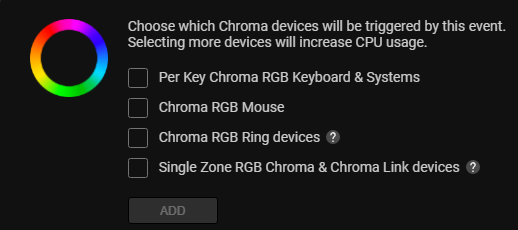
Note: This feature will overwrite the Razer Synapse 4 and Razer Chroma App RGB settings. Device names will also not be displayed.
What do I need to use the Streamer Companion App?
Ensure that you have Razer Synapse and the Chroma Connect module installed. Razer Synapse must be signed into and running in order to install and use the Streamer Companion App.
Do I need to sign up to use the Streamer Companion App?
When first opening the Streamer Companion App, you will be prompted to link to either your Twitch or Streamlabs account. Link to your preferred streaming account, and you're good to go!
Can I link both my Streamlabs and Twitch accounts?
Yes. You can link both Streamlabs and Twitch accounts to the Streamer Companion App.
| Documentation | Language |
|---|---|
| User Guide (English) | English |
| User Guide (Spanish) | español |
| User Guide (French) | français |
| User Guide (German) | Deutsche |
| User Guide (Portuguese-Brazilian) | português |
| User Guide (Russian) | русский |
| User Guide (Traditional Chinese) | 繁體中文 |
| User Guide (Simplified Chinese) | 简体中文 |
| User Guide (Korean) | 한국어 |
| User Guide (Japanese) | 日本語 |

