
To ensure the longevity of your Razer Iskur and to keep yourself and others safe, it’s important to understand and adhere to its minimum and maximum operating limits. Proper usage will help prevent any damage to the chair and avoid potential injuries.
Follow the detailed instructions below to adjust the Razer Iskur gaming chair.
Select adjustment type
Lumbar support adjustment
With Razer Iskur’s ergonomic lumbar support system you can enjoy total lower back support, a fully adjustable lumbar curve that closely aligns to your spine—ensuring ideal posture for maximum comfort in gaming marathons.
To adjust the lumbar support do the following:
-
While seated on the chair, lift the lumbar support lever.
-
Release the lever once the preferred position is achieved.
The lumbar support can protrude up to 130 mm.

You can view the video below for instructions.
If you encounter an issue where the lumbar support does not move after pulling the lever, do the following:
-
Slide out the lumbar support lever from the holder.
-
Turn the lever counterclockwise three times and adjust the fasteners so that they are flush with the lever.
Height Adjustment
To raise or lower the seat do the following:
- To allow the seat to rise, raise your body as you lift the gas lift cylinder lever then release the lever once the preferred height is achieved.
- To lower the seat, remain seated, lift the gas lift cylinder lever then release when the preferred height is achieved.
The gas lift height can be adjusted up to 90 mm.

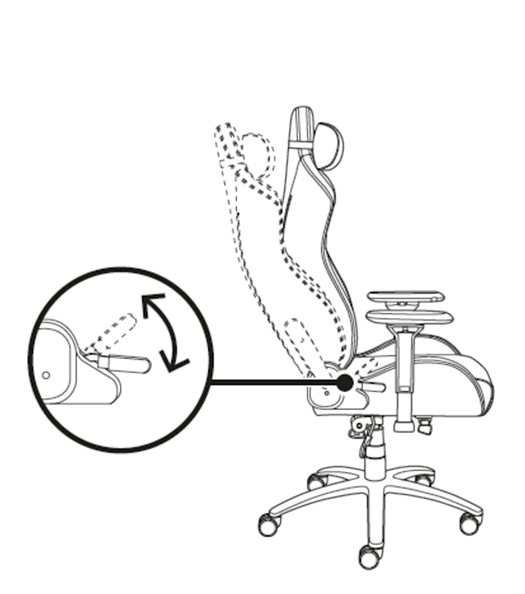
Backseat Adjustment
To adjust the backseat do the following:
- To recline the backseat, pull the backseat lever and lean backward to recline to the preferred angle then push down the lever to lock.
- To reduce backseat reclination, lean forward as you pull the backseat lever then push down the lever to lock once the preferred angle is achieved.
The backseat can be reclined up to 126 degrees.
Seat Tilt Adjustment
To tilt the seat do the following:
- To recline the seat, lift the tilt mechanism lever and lean backward to the preferred angle then push down the lever to lock.
- To reduce seat reclination, lift the tilt mechanism lever and lean forward then push down the lever to lock once the preferred angle is achieved.
The seat can be tilted up to 11 degrees.
Note: If the seat tilts too easily or requires a lot of effort, adjust the tension knob. Turn clockwise to loosen and counterclockwise to tighten.

Armrests Adjustment
Razer Iskur’s 4D armrests allow a fully customizable positioning, helps match the way you sit.
To adjust the height of the armrests do the following:
-
Push the armrests height adjustment button and raise or lower the armrests.
-
Release the button once the preferred position is achieved.

-
To move the armrests forward and backward, left and right, or inward and outward, push the armrests “2” and “3” adjustment buttons.

You can view the video below for instructions.

