A Razer headset with no sound might be caused by dirt or debris in audio ports and on the audio jack, improperly plugged-in audio jack, hub connections, incorrect playback device levels or settings, software issues, or faulty audio drivers.
Here are some suggestions that can help resolve this issue:
-
Check the volume control and make sure it is not turned all the way down. Rotate the volume knob to increase or decrease the volume as shown below:

-
To rule out any source issues, connect your Razer BlackShark V2 to a different audio source.
-
Ensure the source volume is not set to zero.
-
Ensure you have selected the correct playback audio device.
Using the 3.5 mm connection:
-
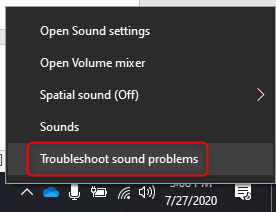
Try the sound troubleshooter if you are using Windows 10 build 2004.
- Right click on the volume icon and click “Troubleshoot sound problems” to start and follow the troubleshooter recommendations.
-
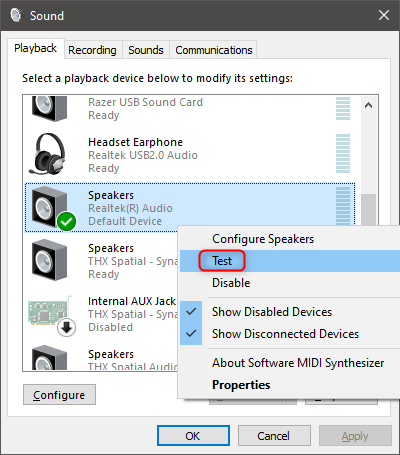
Navigate to the “Sound Control Panel” and test the speakers if you are using another build of Windows 10.
- Right-click on the sound icon and click on “Sound Control Panel” and select your internal sound card.

-
Right-click on it and click “Test”.