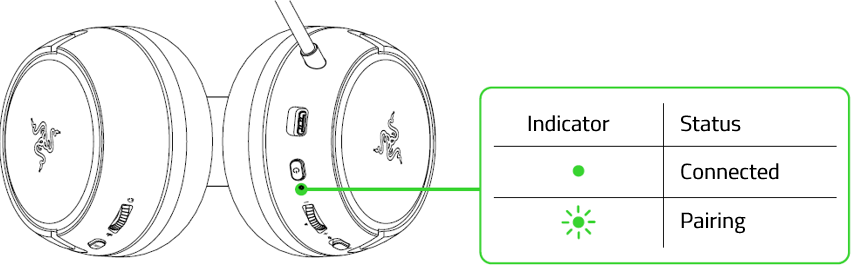
Pairing your Razer Kaira or Kaira Pro to an Xbox or Xbox One establishes a stable wireless connection for an uninterrupted gaming experience.
Follow the detailed instructions below to pair or connect a Razer Kaira and Kaira Pro to Xbox and Xbox One.
Select an action
Pair the Razer Kaira Pro to Xbox One console
-
Press the connect button on your console.

-
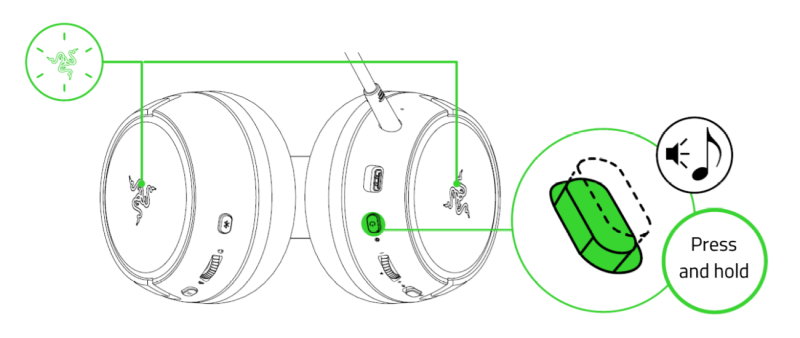
Press and hold the power button until the status indicator is briefly lit or until your hear a tone. The Razer logos on both earcups will also start blinking green to indicate that the headset is in Xbox pairing mode.
-
Wait until the Razer logos briefly becoming static green indicating that the headset is now paired to the Xbox console.

Pair the Razer Kaira Pro to Xbox console
There are three ways to pair your Razer Kaira Pro for Xbox.
A. TO YOUR XBOX CONSOLE
-
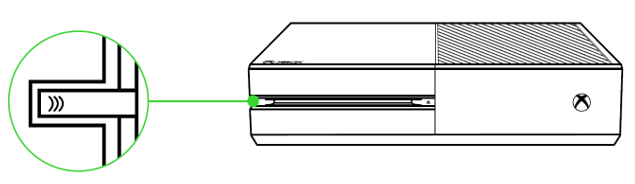
Press the Connect button on your console.
-
Press and hold the power button until the status indicator is briefly lit or until you hear a tone. The Razer logos on both earcups will also start blinking green to indicate that the headset is in Xbox pairing mode.

-
Wait until the Razer logos briefly become static green, indicating that the headset is now paired to the Xbox console.

B. TO YOUR PC VIA XBOX WIRELESS ADAPTER FOR WINDOWS 10*
Make sure that your Xbox Wireless Adapter for Windows 10 is up-to-date. Some systems have Xbox Wireless built-in which allows you to pair your headset by using Bluetooth & other devices in Settings.
-
Plug your Xbox Wireless Adapter in for Windows 10* to your PC.
-
Press the "Connect" button.

-
While powered off, press and hold the power button until the status indicator is briefly lit or until you hear a tone. The Razer logos on both earcups will also start blinking green to indicate that the headset is in Xbox pairing mode.

-
Wait until the Razer logos briefly become static green, indicating that the headset is now paired to the wireless adapter.

C. TO YOUR MOBILE DEVICES VIA BLUETOOTH
-
Press the Bluetooth / Multi-function button until the status indicator is lit or until you hear a tone to activate Bluetooth pairing mode.
-
Follow your device’s instructions to pair it with your headset. Once the headset is paired, the status indicator will briefly change to static blue.

Pair the Razer Kaira to Xbox One console
-
Press the connect button on your console.
-
Press and hold the power button until the status indicator is briefly lit or until your hear a tone.
-
Wait until the status indicator becomes static green, indicating that the headset is now paired to the Xbox console.
Pair the Razer Kaira to Xbox console
There are two ways to pair your Razer Kaira for Xbox.
A. TO YOUR XBOX CONSOLE
-
Press the "Connect" button on your console.

-
Press and hold the power button until the status indicator is briefly lit or until you hear a tone.

-
Wait until the status indicator becomes static green, indicating that the headset is now paired to the Xbox console.

B. TO YOUR PC VIA XBOX WIRELESS ADAPTER FOR WINDOWS 10*
Make sure that your Xbox Wireless Adapter for Windows 10 is up-to-date. Some systems have Xbox Wireless built-in which allows you to pair your headset by using Bluetooth & other devices in Settings.
-
Plug your Xbox Wireless Adapter in for Windows 10* to your PC.
-
Press the "Connect" button.

-
While powered off, press and hold the power button until the status indicator is lit, or until you hear a tone.

-
Wait until the status indicator becomes static green, indicating that the headset is now paired to the wireless adapter.