How to disable the Razer laptop’s built-in keyboard

| Answer ID: 5548
This is a step-by-step guide on how to disable the Razer Blade's built-in keyboard.
To disable the Razer Blade laptop’s built-in keyboard, follow the steps below:
  1. Enter “Device Manager” on your Windows Search menu.
    Device Manager in the Windows search menu
  2. Look for “Keyboards” and click its arrow to expand.
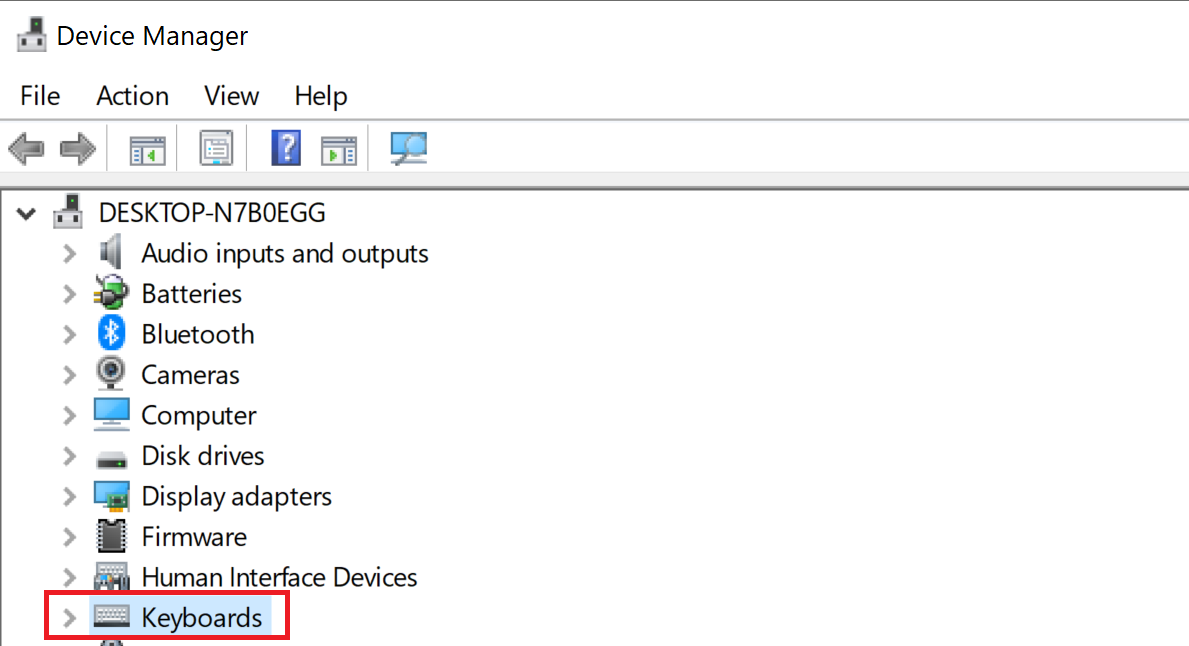
    Keyboards option under Device Manager in Windows
  3. Right-click on the Razer Blade keyboard and click “Uninstall device”.
    Keyboards settings highlighting Uninstall device option under Device Manager
  4. Click “Yes” in the confirmation window that appears.
Your laptop keyboard is now disabled.

Is this answer helpful?