

Ultimate visual fidelity awaits with the Razer Ripsaw X — a dedicated capture card that connects your favorite cameras directly to your stream. With up to 4K 30 FPS capture and ultra-low latency for immersive quality, unrivalled performance now comes in a compact form factor.

Device Layout

- USB 3.0 connector
- Status indicator
- HDMI 2.0 input port
System Requirements
-
DSLR or Mirrorless camera / Camcorder / Action camera with HDMI output
-
Desktop / Laptop (Windows® 10 64-bit or higher) with a USB 3.0 port
CPU:
-
Desktop: Intel® Core™ i5-6100 / AMD® Ryzen™ 5 1400 or higher
-
Laptop: Intel® Core™ i7-4810MQ / AMD® Ryzen™ 5 5500U or higher
GPU:
-
Desktop: NVIDIA® GeForce® GTX 660 or higher
-
Laptop: NVIDIA® GeForce® GTX 870M or higher
-
-
Memory: 8 GB Dual-channel or higher
Full Technical Specifications
| Category | Specification |
|---|---|
|
Output |
USB UVC/UAC Audio-Video Raw Data |
|
Output interface |
USB 3.0 |
|
Video input interface |
HDMI 2.0 |
|
Max video input resolution |
3840 x 2160 at 60 FPS 1920 x 1080 at 120 FPS |
|
Max video capture resolution |
3840 x 2160 at 30 FPS 1920 x 1080 at 120 FPS |
|
Color format |
NV12, YUY2 |
|
Bit depth |
NV12: 12 bits YUY2: 16 bits (Only available for 1080p 60 FPS and lower resolutions) |
|
Chroma sub-sampling |
NV12: 4:2:0 YUY2: 4:2:2 (Only available for 1080p 60 FPS and lower resolutions) |
|
Cable length |
3.15 in / 80 mm |
|
Approximate size |
W: 3.47 in / 88 mm H: 0.59 in / 15 mm D: 1.38 in / 35 mm |
|
Approximate weight |
53 g / 0.12 lbs |
How To
How do I set up the Razer capture card?
-
Connect the Razer capture card to any of the USB 3.0 ports on your PC.

-
Connect your camera or video capture device to the HDMI 2.0 input port of the Razer capture card.
Note: HDMI cable is not included.
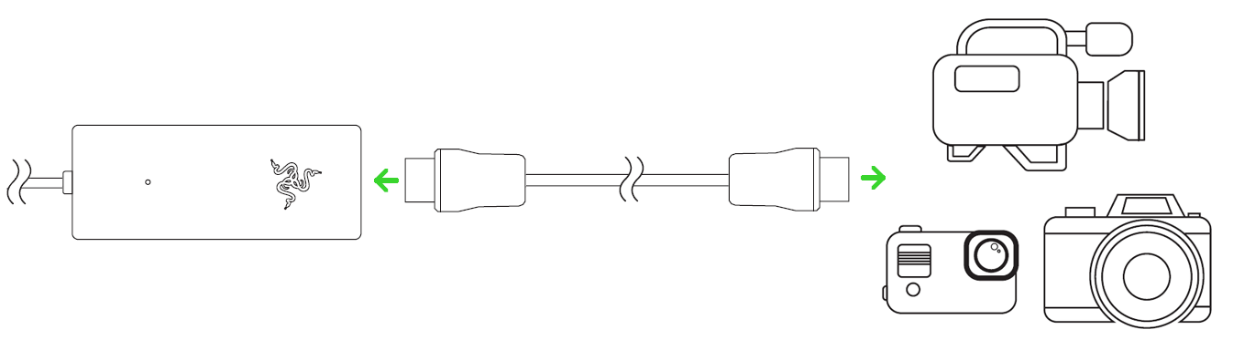
-
Launch any camera or streaming application and add the Razer capture card as the video capture device. The capture card’s status indicator will light up indicating that the device is active.
How do I clean the Razer capture card?
- Unplug all connections and switch off your device.
- Wipe the surface of your device using a lint-free microfiber cloth.
See the answer below for more details.
General Information
Do I need Synapse to use the Razer capture card?
No, Razer Synapse is not necessary. The Razer capture card is a plug-and-play device.
What applications or streaming software do I use with the Razer capture card?
Launch any camera or streaming application and add the Razer capture card as the default camera or video capture device.
| Documentation | Language |
|---|---|
| User Guide (English) | English |
| User Guide (Spanish) | español |
| User Guide (French) | français |
| User Guide (German) | Deutsche |
| User Guide (Portuguese-Brazilian) | português |
| User Guide (Russian) | русский |
| User Guide (Traditional Chinese) | 繁體中文 |
| User Guide (Simplified Chinese) | 简体中文 |
| User Guide (Korean) | 한국어 |
| User Guide (Japanese) | 日本語 |
Please see our warranty policy for a complete review of our warranty policy.
You are eligible for Limited Warranty support for the following periods of time commencing upon the date of retail purchase of your Product (Warranty Period).
| Product | Warranty Period |
|---|---|
| 2021 and Older Model Laptops | 1 yeara |
| 2022 and Newer Model Laptops | 1 yeara 2-year limited battery warrantya |
| Razer Viper Mini Signature Edition | 3 year |
| Razer Phone and Phone Accessories | 1 year |
| Razer Edge Gaming Handhelds | 1 year |
| Razer Mice | 2 years |
| Razer Keyboards and Keypads | 2 yearsb |
| Razer Huntsman Signature Edition | 5 years |
| Razer Headsets, Earphones and Earbuds | 2 yearsb |
| Razer Wireless Mouse and Mat Bundles | 2 yearsb |
| Razer Mouse Mats | 1 yearc |
| Razer Speaker Systems and Broadcaster Devices | 1 year |
| Razer Controllers and Chargers | 1 year |
| Razer Routers (except Singtel) | 1 year |
| Razer Routers (Singtel) | 2 years |
| Razer Monitors | 1 year |
| Smart Watches and Eyewear | 2 years |
| Razer Case Fans | 2 years |
| Razer Liquid Cooling | 2 years |
| Razer Power Supplies | 5 years |
| Razer Fan and RGB Controllers | 2 years |
| Razer Cases | 1 year |
| Razer System Accessories | 1 year |
| Razer Docks | 1 year |
| Wearable Air Purifiers | 1 year |
| Razer Gaming Accessories | 1 yearc |
| Razer Rechargeable Batteries for Wireless Devices | 1 yeard |
| Razer Gaming Chairs | 3 yearse |
| Chair Frame, mechanisms and armrests | Up to 5 years |
| Mesh backing and seat pan | Up to 1 year |
All new Products will have the Warranty Periods listed above, subject to applicable local law. Certain "end of life", sell out or discontinued Products may have a shorter Warranty Period; this will be clearly marked at the time of purchase and the given Warranty Period will be stated at that time. Refurbished Products purchased from Razer.com will have the lesser of a 1 year warranty period or the warranty period as stated above. Refurbished products not purchased from Razer.com will have a 90 day warranty period. If you are uncertain whether your Product is eligible for Limited Warranty support, please contact our support team for clarification.
Please note that third-party products may be covered by the product manufacturer's warranty and these warranty terms are exclusively provided by the product manufacturer. Razer does not offer a warranty for third-party products. If you need product or warranty support with your third-party product, please contact the product manufacturer. Please consult the product documentation provided by the product manufacturer for details.
If you are uncertain whether your Product is eligible for Limited Warranty support, please contact our support team for clarification.
Warranty Footnotes
- [a] If you are a customer outside of the U.S. and have validly purchased a Razer Extended Warranty for your product, the Warranty Period shall be extended for another one (1) year period, to be a total of two (2) years commencing upon the date of retail purchase of your Razer Product. The Razer Extended Warranty does not apply to batteries. Aside from the change to Warranty Period, the Razer Extended Warranty does not alter any other terms and conditions of the Limited Warranty.
- [b] Products purchased prior to October 1st, 2018 maintain the original 1 year warranty (keyboards with mechanical switches maintain original 2 year warranty).
- [c] Warranty period for Razer Firefly HyperFlux is 2 years.
- [d] Products purchased prior to October 1st, 2018 maintain the original 6 month warranty.
- [e] Limited Warranty: The Razer Iskur is free from defects in workmanship, materials and construction for three years from the date of purchase. In the event that a defect is found, the manufacturer will either repair or replace the defective item, at its discretion. Exclusions and Limitations: This Limited Warranty does not cover cosmetic damage, minor cosmetic abnormalities and normal wear and tear, including without limitation scratches, dents, discoloration and tears in the head pillow, seat cushion, PU leather, Armrest and stitches of the upholstery.

