
Applicable Models
Firmware v1.01.01_r1
- https://rzr.to/EqPiUc | August 11, 2021
- Fixed Static lighting flashing issue
STEP-BY STEP-PROCESS
Before you start
-
If using a laptop, ensure it is plugged into a power outlet.
-
Save any open documents on your computer.
-
Close all other programs.
-
Download the latest updater.
Update Process
-
Run the updater.
-
Click “Yes” if the User Account Control window pops up to proceed.
-
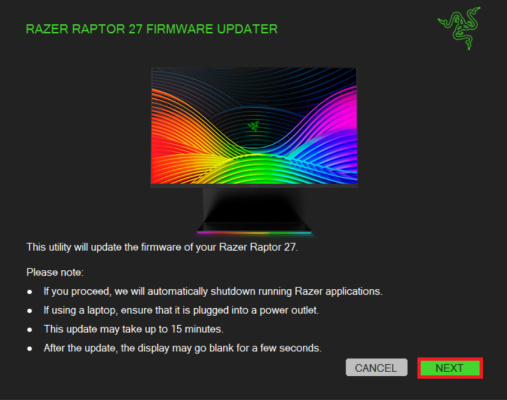
Click "NEXT" after reading the updater precautions.
-
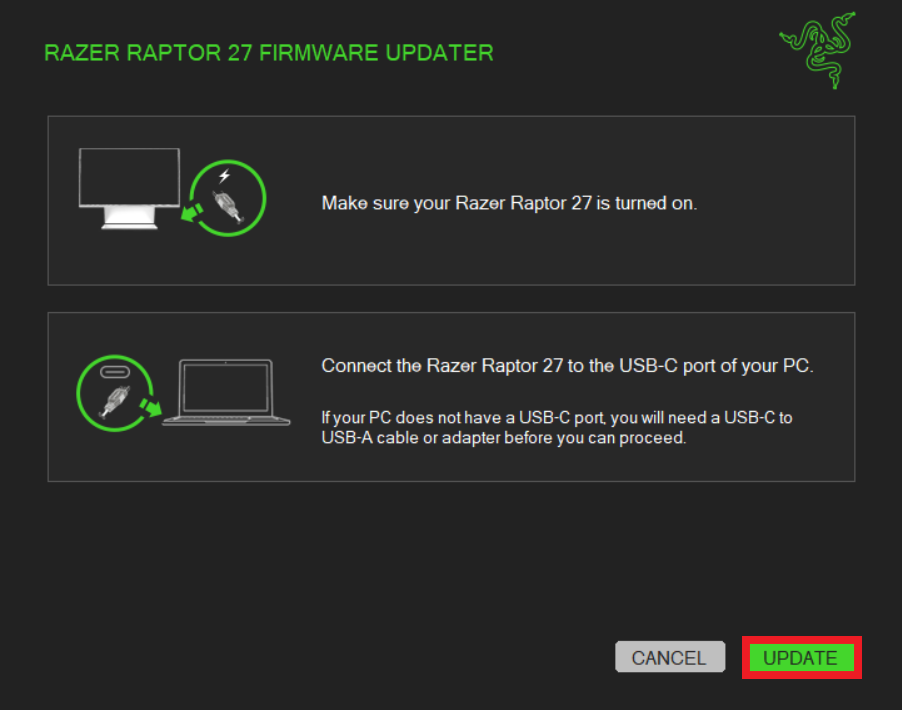
Turn on your Razer Raptor 27.
Note: Display output must be via USB-C port (monitor input source: Type-C).
-
Connect the Razer Raptor 27 to the USB-C port of your PC.
Note: You must connect directly to the USB-C port on your PC. Do not use a USB-C adapter or hub.
-
Click "UPDATE" to initialize the update process.
-
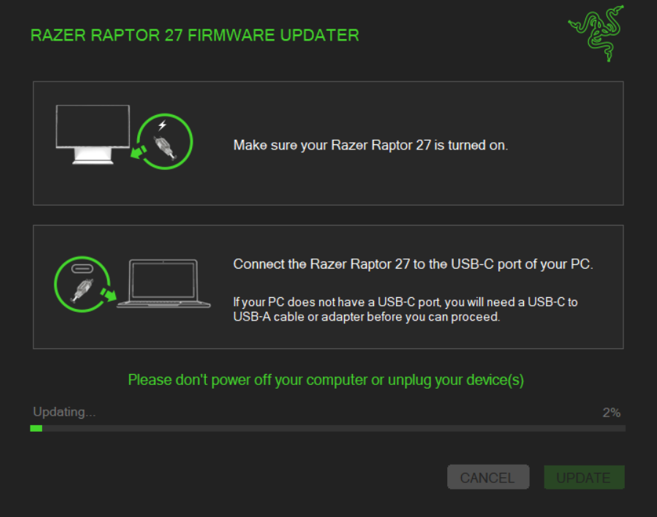
Wait for the update process to complete.
-
Click "CLOSE" once the update is complete.
The firmware on your Razer Raptor 27 is now updated.

