
The Razer Huntsman V2 Analog and Razer Huntsman Mini Analog keyboards are currently detected by Windows as both keyboard and Xbox controller. Select your preferred default controller to resolve this issue.
Important: Exit the game before starting this process.
Step-by-step process
-
Enter "game controllers" in the Windows search bar.
-
Click "Set up USB game controllers".

-
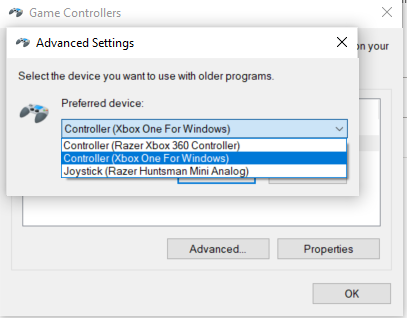
Click the "Advanced..." button.

-
Choose your preferred Xbox controller from the "Preferred device" drop-down list.
- Start the game.

