
Razer Stream Controller | RZ20-04350 Support
The Razer Stream Controller is divided into two elements that allow you to seamlessly move between your tools and applications.
A workspace is a toolbox or collection of related functions. On the Razer Stream Controller, you can switch between various workspaces (or toolboxes) efficiently using the Workspace buttons 1 to 7, allowing you to perform your most needed actions across applications.
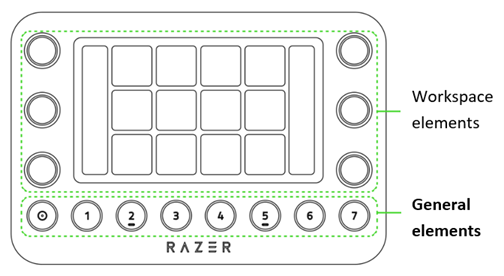
Workspace elements
Controlled by workspaces, the functions of the tactile analog dials and haptic Switchblade keys change based on the current workspace. See At a Glance: Razer Stream Controller | RZ20-04350 for the Razer Stream Controller for the full device layout.
-
Tactile analog dials
-
Use the Tactile analog dials to control variable values such as brightness sliders, volume level, or media track scrolling.
-
Press function to reset values, toggle other settings, or assign a preferred action or function.
-
-
Dial information panels
-
Use the rectangular panels to display the current function or value of its corresponding analog signal.
-
-
Haptic Switchblade keys
-
Activate different functions such as open tools, presets, control media, or launch apps within every workspace.
-
Set multiple pages for each switchblade key that you can access by swiping left or right on the switchblade page.
Note: These keys are colored to indicate their function.
-
General elements
Comprised of the home and customizable workspace buttons, use these buttons to access preferred functions or workspaces across various applications quickly.
-
Use the Home
 button to return or go back to your home workspace.
 -
Use the Workspace
 buttons 1 to 7 to customize and remain constant even as you switch between apps.

