
Windows Memory Diagnostic tool is a built-in troubleshooting utility that tests your computer's Random Access Memory (RAM). Run this program when your computer starts to lag, freeze, reboot on its own, or display a blue screen. The tool also reports problems found in the applications installed on your computer.
-
Press the “Windows” + “S” keys to open the Search screen.
Alternatively, right-click on “Start” and then select “Search”.

-
Type “Diagnose your computer” in the Search field and press “Enter”.
-
Click “Restart now and check for problems (recommended)”. Make sure to save your work and close any open programs before restarting.
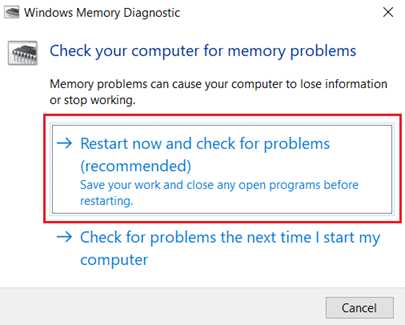
Note: The computer will restart and then the Windows Memory Diagnostic tool will run the memory test. Once complete, the computer will restart again.
-
Review the error report. If the tool detects any errors, assistance is required.

