The Razer Blade 14" (2022) is loaded with the latest features for the most powerful gaming experience yet.
Here are the most recent updates for Razer Blade 14" (2022):
-
Equipped with the Microsoft Pluton Processor
-
Supports dual screen when using the Razer Thunderbolt™ 4 Dock
-
Supports USB4 (Backward compatible with USB 3.2, USB 2.0, and Thunderbolt 3)
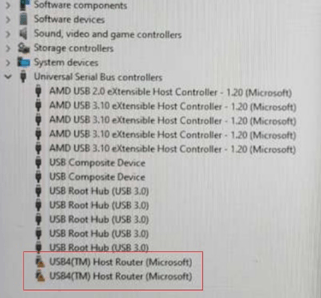
Step-by-step process on how to determine if your Razer Blade 14" (2022) supports USB4
-
Press the "Windows" + "X" keys.
-
Select "Device Manager".

-
Expand "Universal Serial Bus controllers" and look for USB4.

If the USB4 shows a yellow exclamation mark, double-click on it and perform a Windows Update (including all AMD drivers under the optional update). If the USB4 is not displayed, this means it is not yet supported. See Razer Blade 14" (2022) Firmware Updater | RZ09-0427x for instructions on how to upgrade the firmware of the Razer Blade 14" (2022).