
Below are the steps to fix your Razer Edge that is not producing sound on your headset.
Note: Before you proceed, ensure the Razer Edge is up to date. Go to Settings > System update > Check for update.
Connection via Bluetooth
- Ensure both the headset and the Razer Edge have enough power.
- Ensure Razer Edge’s Bluetooth is enabled and properly paired to your headset.
- Test the headset on another Bluetooth-enabled device. If the headset is working on another device but the issue persists:
- Forget the paired connection from the Razer Edge.
- Perform a hard reset.
- Pair the headset to the Razer Edge again and check.
- If the issue persists, back up your files and perform a factory reset.
Connection via USB-C or 3.5 mm analog port adapter
- Ensure the audio settings are correct and the device is not muted.
- Max out “Media volume” for testing.
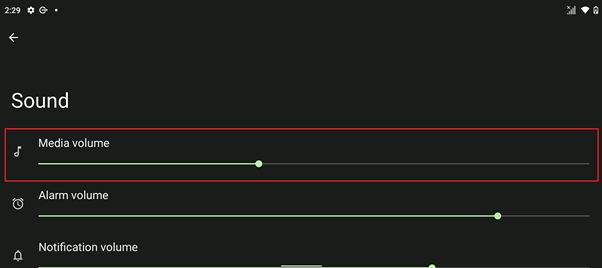
- Ensure you are not connected to any Bluetooth-enabled audio device. Android disables the 3.5 mm analog port when a Bluetooth device is enabled.
- Perform a hard reset.
- Test the device by playing any music or video.
- If the issue persists, test the headset on another device. If the headset is working on another device, test another compatible audio device on the Razer Edge.
- If the issue persists, back up your files and perform a factory reset.

