
The following issues arise due to poor network coverage:
-
Poor call quality
-
Break up or drop calls
-
Network busy
-
No service
Below are the troubleshooting tips to fix the issues.
-
Check if the Razer Edge is up-to-date by performing a system update.
-
Signal Troubleshooting
Check the network coverage on the Razer Edge. Move to a different location that is more open with fewer obstacles. Then, check the signal.
Note: Network signal is affected by walls, buildings, trees, and weather.
-
Device Settings Troubleshooting
-
Swipe down to display quick settings from your home screen.
-
Ensure that the "Airplane mode" and "Do Not Disturb" are not enabled.
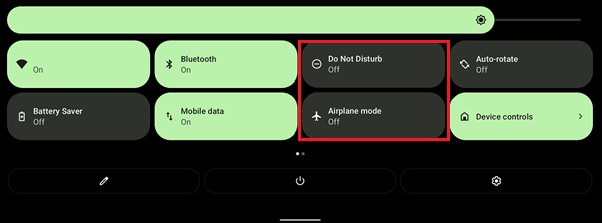
If they are enabled, tap the icon(s) to disable.
-
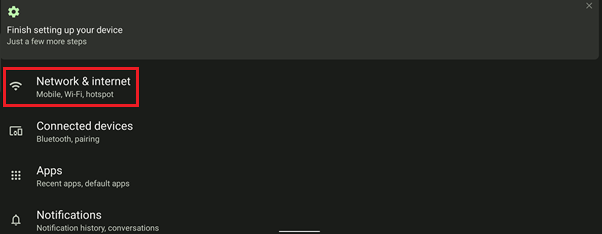
Go to “Settings” > “Network & internet”.
-
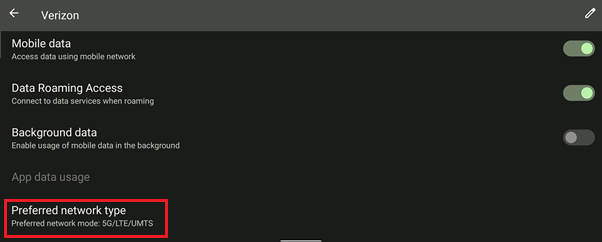
Go to “Mobile network”.

-
Tap "Preferred network type".
-
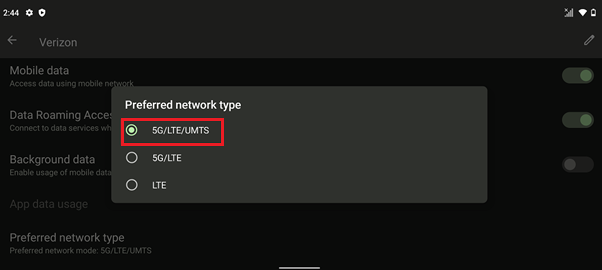
Ensure that the preferred network type is "5G/LTE/UMTS".
-
Ruling Out
-
If you are still experiencing the issue despite following the instructions above, perform a hard reset.
-
If the issue persists, back up your phone data and perform a factory reset.

