
Below are the tips to get the best battery life and performance and to avoid damage to your device.
-
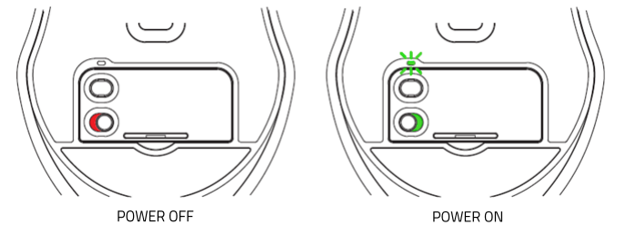
Set the Razer mouse to the "off" position while in charging mode. Fully depleted batteries will possibly not charge when the mouse is left in the "on" state.
-
Do not store your battery in a fully depleted state. Unlike NiCad batteries, Razer mice that use Lithium-ion batteries will not develop any type of memory and there is no need to routinely fully discharge your battery. In fact, fully discharging a Lithium-ion battery can result in damage to the battery.
-
Store your battery just below a fully completed charge if you are not planning on using your battery for an extended period of time.
-
Always turn your Razer mouse to the "off" position when not in use to prevent a slow discharge of your battery.
-
Avoid storing your battery in excessive heat. Lithium-ion batteries prefer cooler temperatures.

