
The Razer Emote Display is a standalone display of emoticons that works with any streaming setup to enhance audience interaction. Working with the Streamer Companion App, you can create your own customized emoticons or choose from a hundred of static and animated presets.

This standalone emoticon display can be set up alone or together with the Razer Seiren Emote on a stream setup just like the image shown below.

The above image shows the stream setup consisting of the following Razer devices:
- Razer Blade 15 – Streamlabs OBS setup to control stream and Streamer Companion App
- Razer Raptor – External display for gaming
- Razer Kiyo – As the external video capture source to capture the streamer & Razer
- Emote Display/Razer Seiren Emote
- Razer Emote Display
- Razer Seiren Emote
Step-by-step process:
-
Using the Streamer Companion App, you can set up chat messages within the Twitch Chat from the stream to trigger custom emoticons.
Example:
In this scenario, two keywords are used that will trigger emoticons to be displayed on the added devices.
- The keyword “hello” to trigger the “Heart Eyes” emoticon is used.
Whenever the stream detects the keyword “hello” within the stream chat, the “Heart Eyes” emoticon will be displayed for 10 seconds on the Emote Display and Seiren Emote.
- An additional keyword “sam” to trigger a “Skeleton head” emoticon to be displayed is used as another example.
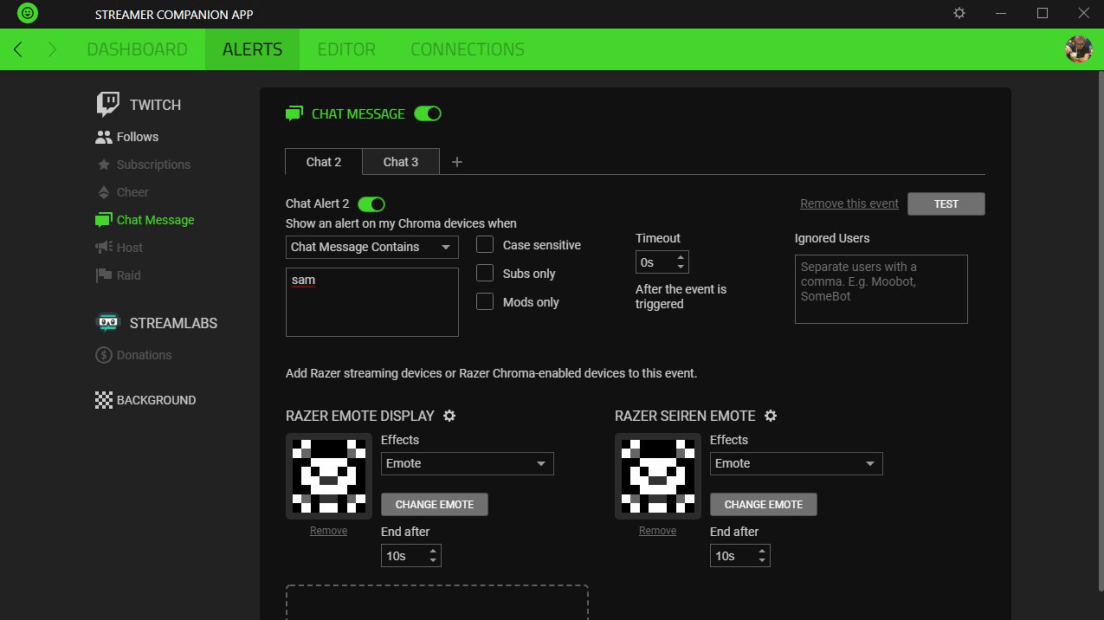
Sample Video:
- The keyword “hello” to trigger the “Heart Eyes” emoticon is used.
- Within the Streamer Companion App, you can also set up stream related triggers such as Follows/Subscriptions/Cheers/Host/Raid.
Example:
In this scenario, the devices are set up to display a custom emoticon whenever there is a new follower for the channel.
- Whenever the stream detects a new follower, it will display the “Heart” emoticon on the devices.
Sample Video:
- Whenever the stream detects a new follower, it will display the “Heart” emoticon on the devices.

