
Applicable products:
- RZ09-01682
- RZ09-01962
- RZ09-01963
- RZ09-01964
- RZ09-02393
- RZ09-02394
- RZ09-02810
- RZ09-02812
- RZ09-01020
- RZ09-01021
- RZ09-01161
- RZ09-01301
- RZ09-01302
- RZ09-01952
- RZ09-01953
- RZ09-02385
- RZ09-02386
- RZ09-02886
- RZ09-02887
- RZ09-02888
- RZ09-02705
- RZ09-00830
- RZ09-00990
- RZ09-00991
- RZ09-01171E1
- RZ09-01171E5
- RZ09-01662
- RZ09-01663
- RZ09-02202
Razer has been alerted to certain Intel Management Engine vulnerabilities in the Intel chipsets of several Razer laptop models. This vulnerability may expose device to remote hacking which attackers can execute arbitrary code or rewrite the Intel ME firmware version without the user or operating system's consent
To solve this, Razer has released firmware updates specific to individual models. Make sure that you download the correct firmware specific to the model number located at the bottom of your device.
Intel ME Firmware Update v1.1.1.0
For Model Numbers with the prefixes:
- RZ09-02385
- RZ09-02386
- RZ09-02705
- RZ09-02810
- RZ09-02812
- Download the firmware updater at https://rzr.to/HXakt
For Model Numbers with the prefixes:
Important Note: A minimum BIOS version is required for these models before proceeding.
Please ensure you have installed the previous EC and BIOS updates before proceeding with this update. Required updates can be found by visiting the links below.
Download the EC Updater instructions https://rzr.to/CUmRk
Download the BIOS Updater instructions at https://rzr.to/YnPqSC
- RZ09-02886
- RZ09-02887
- RZ09-02888
- Download the firmware updater at https://rzr.to/HXakt
For Model Numbers with the prefixes:
Important Note: A minimum BIOS version is required for these models before proceeding.
Please ensure you have installed all previous security and BIOS updates before proceeding with this update. Required BIOS updates can be found here.
- RZ09-01952
- RZ09-01953
- RZ09-01682
- RZ09-01962
- RZ09-01963
- RZ09-01964
- RZ09-02393
- RZ09-02394
- RZ09-01662
- RZ09-01663
- RZ09-02202
- Download the firmware updater at https://rzr.to/CLjkP
For Model Numbers with the prefixes:
- RZ09-01020
- RZ09-01021
- RZ09-01161
- RZ09-01301
- RZ09-00990
- RZ09-00991
- RZ09-01171E1
- RZ09-01171E5
- Download the firmware updater at https://rzr.to/ziDvzq
For Model Numbers with the prefixes:
- RZ09-00830
- Download the firmware updater at https://rzr.to/MEYVM
Follow the detailed instructions below to run the updater on your device.
Step-by-step Process
Before you start
-
Please ensure you have installed all the latest Microsoft® Windows Operating Systems and Security Updates. To help verify that your OS is up to date, please refer to this Microsoft® article.
-
Ensure your Blade is plugged into a wall outlet and not running on battery alone before proceeding.
-
Please save any open documents on your computer and close all other programs before attempting this update
Update process
-
Download the latest Razer Updater from the link found above:
-
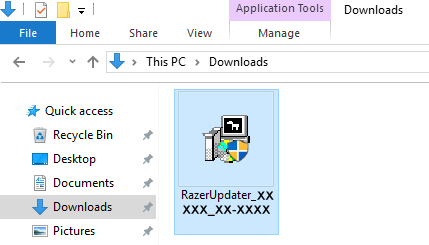
The Razer Updater will automatically download to your default download destination (this should be the Downloads folder unless this has been manually changed)
Note: Be advised that during the update process of your Razer Blade laptop, you will not be able to interact or save progress within other open applications. As such, it is strongly advised that you save your progress and close all other applications or programs prior to launching the Razer Updater and updating the system.
-
Click on RazerUpdater_ to begin the update process.
-
The User Account Control window may pop up to confirm changes that will be made by the application (as seen below). Click ‘"YES" to allow the RazerUpdater_ application to launch.

-
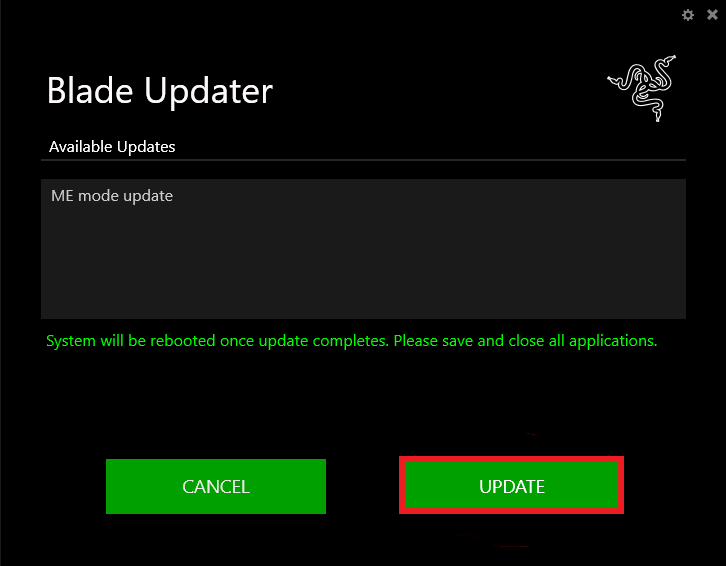
The Blade Updater window will appear with details regarding your current firmware version and the version your Razer Blade laptop will be updated too. (Please note, your version may be different than shown below. If your Blade is not in need of this update, the updater will not proceed from this point.)
-
Click “Update” to initiate the update process of your Razer Blade laptop.
-
A progress bar will appear indicating the status and progression of the installation process. During the installation process, you will not have access to other applications.
-
Once the progress bar reaches 100% completion, your Razer Blade laptop will restart automatically. No further action or steps are required after the progress bar reaches 100%. Once your Blade has restarted your system will be updated.

