
Effective February 3, 2026, Razer Synapse 3 will no longer receive updates or support cloud services. After this date, cloud syncing of configurations across PCs using the same Razer ID will be disabled.
Note: Your installed devices will continue to be configurable in Razer Synapse 3. However, if you uninstall these devices completely, you will need to upgrade to Razer Synapse 4 to continue customization.
Download Razer Synapse 4 and migrate your existing Razer Synapse 3 profiles using the Profile Migration Tool to retain access to your configurations. See How to migrate your Razer Synapse 3 Profile to Razer Synapse 4 for instructions.
The Razer Synapse 3 UI has been updated for the following headsets:
- Razer Kraken Ultimate
- Razer Kraken Tournament Edition
- Razer Kraken Kitty
- Razer Nari Ultimate
- Razer Nari Essential
- Razer Nari
Audio Equalizer Adjustments
|
Old UI (Inside "EQ" tab)  |
New UI (Inside "SOUND" tab)  |
- The Audio Equalizer in the old "EQ" tab has been shifted to the current "SOUND" tab.
- "Game" preset for EQ is now the new default after the update.
- "Game", "Movie", and "Music" presets can now be customized individually as individual EQ settings and reset to its default values.
- "Default" preset for EQ is equivalent to the default flat profile on "Custom".
THX Spatial Audio toggle
|
Old UI (Inside "MIXER" tab)  |
New UI (Inside "SOUND" tab)  |
- THX Spatial Audio on/off button in the old "ENHANCEMENT" tab has been shifted to the current "SOUND" tab as a toggle between Stereo and THX Spatial Audio modes.
Windows Sound Output device option
|
Old "THX Spatial – Synapse" option 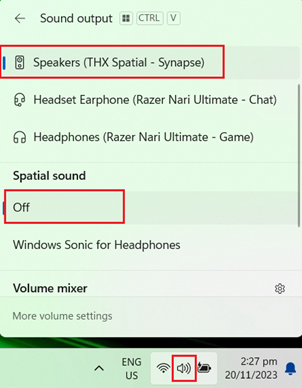 |
Updated selection option 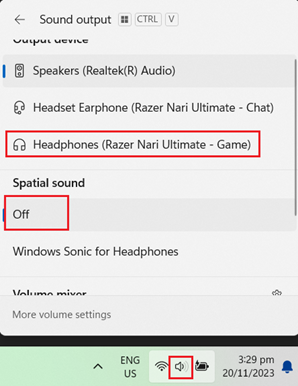 |
- THX Spatial Audio is now embedded into the audio driver. To use your Razer headset with THX Spatial Audio, select the Razer headset as the default Windows Audio Output device, set Spatial sound to "Off" and toggle to THX Spatial Audio mode in Razer Synapse 3.
- For Razer Nari, Razer Nari Ultimate and Razer Kraken Tournament Edition, select the Game endpoint as the default Windows Audio Output device, and toggle to THX Spatial Audio mode in Razer Synapse 3.
Note: THX Spatial Audio will not show up as an option under "Spatial Sound" for both versions, as it is embedded as part of the sound output device.

