Effective February 3, 2026, Razer Synapse 3 will no longer receive updates or support cloud services. After this date, cloud syncing of configurations across PCs using the same Razer ID will be disabled.
Note: Your installed devices will continue to be configurable in Razer Synapse 3. However, if you uninstall these devices completely, you will need to upgrade to Razer Synapse 4 to continue customization.
Download Razer Synapse 4 and migrate your existing Razer Synapse 3 profiles using the Profile Migration Tool to retain access to your configurations. See How to migrate your Razer Synapse 3 Profile to Razer Synapse 4 for instructions.
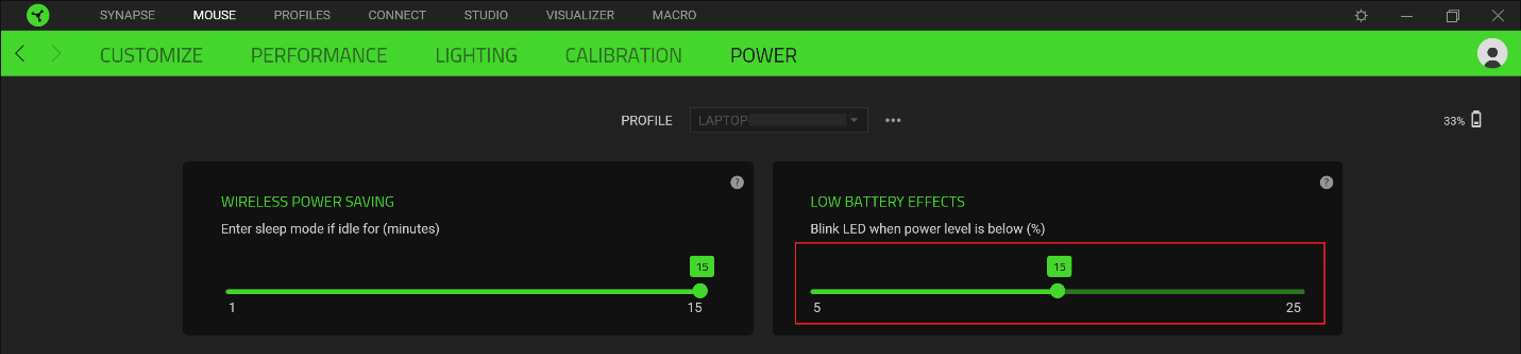
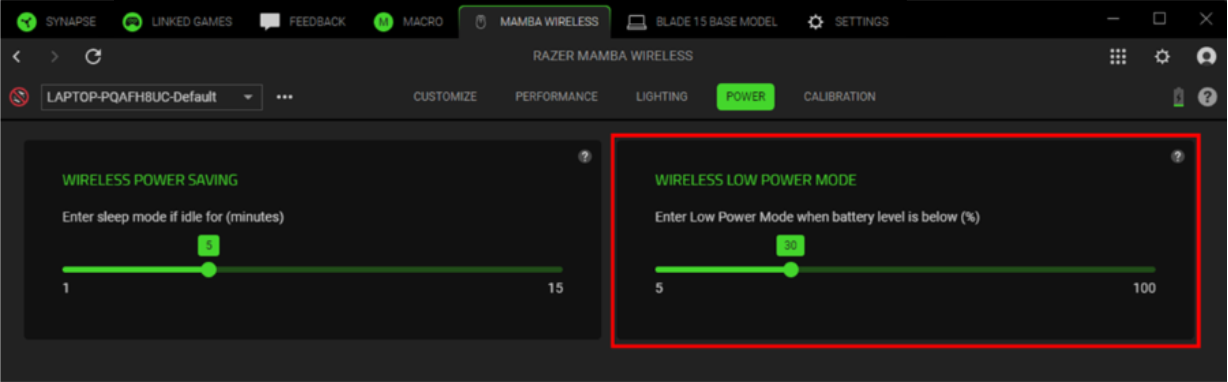
In Low Power mode, your Razer mouse reduces tracking speed and sensor acceleration to save on power. When the battery life goes below the preset battery level, “Low Power” mode will automatically kick in.
Below are the steps on how to set up Low Power mode for Razer mice.
Select Razer Synapse version
Razer Synapse 4
-
Open Razer Synapse 4.
-
Select your mouse from the “DASHBOARD”.
-
Go to the “POWER” tab.
-
Set the battery level you want the “Low Power” mode to activate.
Razer Synapse 3
- Launch Razer Synapse 3.
- Go to “MOUSE” > “POWER”.

- Set the battery level that you want “Low Power” mode to automatically turn on.