

Tips to help you get started
To build the ultimate gaming desktop, it begins with a frame that can support the performance within. Meet the Razer Tomahawk ATX – a mid-tower metal gaming chassis that exudes both form and function, equipped with premium features to accommodate your idea of a perfect rig, whatever it may be.

Device Layout

- USB Type C port (up to 3.2 Gen 2)
- 3.5mm audio jack
- 3.5mm mic jack
- Power Button
- Reset Button
- USB Type A ports (up to 3.2 Gen 1)
- Detachable swivel glass doors
- 120mm fan
- Inner flip panel
- Underglow lighting Powered by Razer Chroma RGB
- Removable HDD/SSD trays x3
- Movable drive rack
- Detachable front panel

- Screws for motherboard and 2.5" SSD mount x29
- Screws for PSU mount x4
- Screws for 3.5" HDD mount x12
- Cable ties x10
- Tool for standoff bolt
- Screws for fan mount x8
- Hook and loop straps x2
Full Technical Specifications
| Category | Specification |
|---|---|
|
Chassis Form Factor |
Mid-Tower |
|
Supported Motherboards |
|
|
Case Material |
SPCC Steel (0.8 mm) Thick and All Tempered Glass side panels |
|
# of Expansion Slots |
7 Expansion Slots |
|
# of Supported Drives |
|
|
Radiator Compatibility |
Up to 360 mm |
|
Maximum CPU Cooler Height |
Up to 176 mm |
|
Maximum GPU Length |
Up to 384 mm |
|
Front Panel I/O |
|
|
Razer Chroma™ Support |
Razer Chroma™ Underglow |
|
Case Dimensions |
19.47 in / 494.6 mm (Height) x 9.26 in / 235.4 mm (Width) x 18.70 in / 475 mm (Depth) |
|
Weight |
29.76 lbs / 13.5 kg |
How To
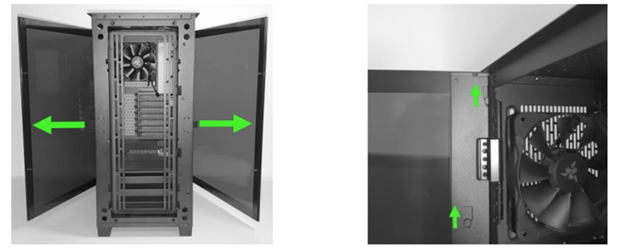
How do I remove the glass panels from the Razer gaming chassis?
Open both detachable swivel glass doors then gently lift up to remove them.
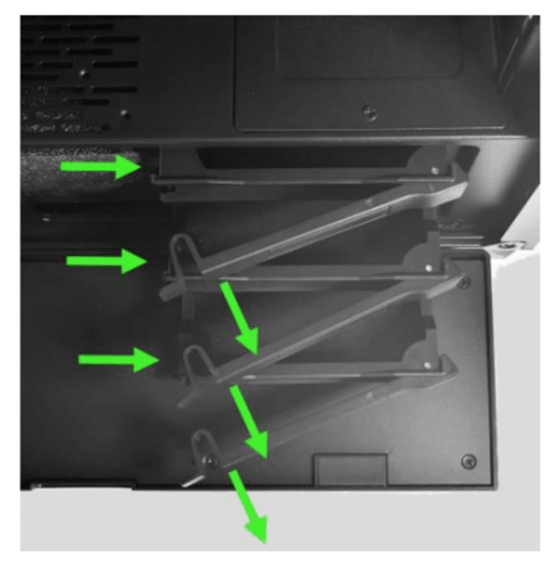
How do I remove the HDD tray from the Razer gaming chassis?
Push the fastener to unlock and gently pull out the tray.
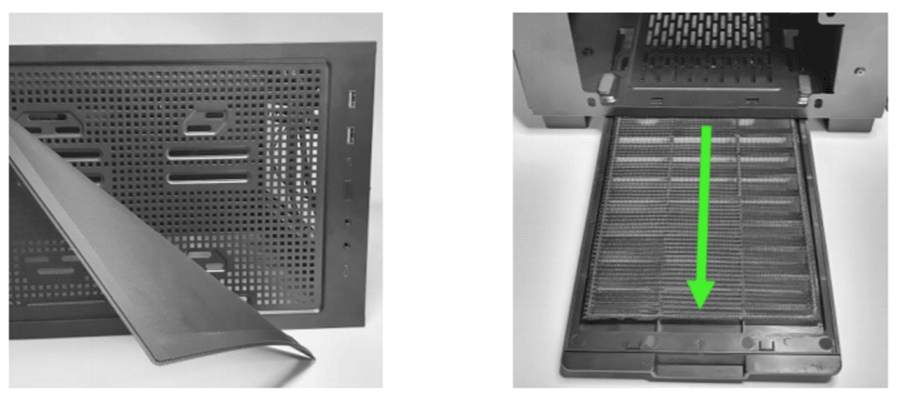
How do I clean the dust filters on the Razer gaming chassis?
There are 2 dust filters located at the top and the bottom of the chassis.
-
Remove the filters as shown below.
-
Wash the filters with clean water.
-
Wipe them with a dry cloth.
-
Reinstall the dust filters.
Note: Keep your chassis at an optimal temperature by cleaning these dust filters as often as possible.
General Information
What is the difference between the two Razer gaming chassis models?
The Razer gaming chassis ATX variant is a mid-tower designed for users that want the ultimate eSports gaming desktop and requires more expansion slots while the Mini-ITX variant offers a simplistic design for those that are in search of a smaller form factor. Both are designed for fast and easy PC builds with easy access to magnetic doors and filters.
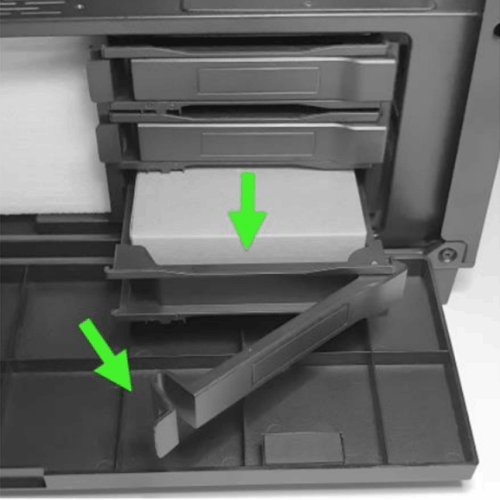
Where can I find the accessories for the Razer gaming chassis?
The accessories pack can be found inside the bottom removable HDD/SSD drive tray.
Does the Razer gaming chassis support water cooling?
Yes. The Razer gaming chassis ATX variant has multiple mounting options on the front and top sides for liquid or air cooling.
| Documentation | Language |
|---|---|
| User Guide (English) | English |
| User Guide (Spanish) | Español |
| User Guide (French) | Français |
| User Guide (German) | Deutsche |
| User Guide (Portuguese-Brazilian) | Português |
| User Guide (Russian) | русский |
| User Guide (Traditional Chinese) | 繁體中文 |
| User Guide (Simplified Chinese) | 简体中文 |
| User Guide (Korean) | 한국어 |
| User Guide (Japanese) | 日本語 |
| Installation Guide | |
| Installation Guide (English) | English |
| Installation Guide (Spanish) | Español |
| Installation Guide (French) | Français |
| Installation Guide (German) | Deutsche |
| Installation Guide (Portuguese-Brazilian) | Português |
| Installation Guide (Russian) | русский |
| Installation Guide (Traditional Chinese) | 繁體中文 |
| Installation Guide (Simplified Chinese) | 简体中文 |
Please see our warranty policy for a complete review of our warranty policy.
You are eligible for Limited Warranty support for the following periods of time commencing upon the date of retail purchase of your Product (Warranty Period).
| Product | Warranty Period |
|---|---|
| 2021 and Older Model Laptops | 1 yeara |
| 2022 and Newer Model Laptops | 1 yeara 2-year limited battery warrantya |
| Razer Viper Mini Signature Edition | 3 year |
| Razer Phone and Phone Accessories | 1 year |
| Razer Edge Gaming Handhelds | 1 year |
| Razer Mice | 2 years |
| Razer Keyboards and Keypads | 2 yearsb |
| Razer Huntsman Signature Edition | 5 years |
| Razer Headsets, Earphones and Earbuds | 2 yearsb |
| Razer Wireless Mouse and Mat Bundles | 2 yearsb |
| Razer Mouse Mats | 1 yearc |
| Razer Speaker Systems and Broadcaster Devices | 1 year |
| Razer Controllers and Chargers | 1 year |
| Razer Routers (except Singtel) | 1 year |
| Razer Routers (Singtel) | 2 years |
| Razer Monitors | 1 year |
| Smart Watches and Eyewear | 2 years |
| Razer Case Fans | 2 years |
| Razer Liquid Cooling | 2 years |
| Razer Power Supplies | 5 years |
| Razer Fan and RGB Controllers | 2 years |
| Razer Cases | 1 year |
| Razer System Accessories | 1 year |
| Razer Docks | 1 year |
| Wearable Air Purifiers | 1 year |
| Razer Gaming Accessories | 1 yearc |
| Razer Rechargeable Batteries for Wireless Devices | 1 yeard |
| Razer Gaming Chairs | 3 yearse |
| Chair Frame, mechanisms and armrests | Up to 5 years |
| Mesh backing and seat pan | Up to 1 year |
All new Products will have the Warranty Periods listed above, subject to applicable local law. Certain "end of life", sell out or discontinued Products may have a shorter Warranty Period; this will be clearly marked at the time of purchase and the given Warranty Period will be stated at that time. Refurbished Products purchased from Razer.com will have the lesser of a 1 year warranty period or the warranty period as stated above. Refurbished products not purchased from Razer.com will have a 90 day warranty period. If you are uncertain whether your Product is eligible for Limited Warranty support, please contact our support team for clarification.
Please note that third-party products may be covered by the product manufacturer's warranty and these warranty terms are exclusively provided by the product manufacturer. Razer does not offer a warranty for third-party products. If you need product or warranty support with your third-party product, please contact the product manufacturer. Please consult the product documentation provided by the product manufacturer for details.
If you are uncertain whether your Product is eligible for Limited Warranty support, please contact our support team for clarification.
Warranty Footnotes
- [a] If you are a customer outside of the U.S. and have validly purchased a Razer Extended Warranty for your product, the Warranty Period shall be extended for another one (1) year period, to be a total of two (2) years commencing upon the date of retail purchase of your Razer Product. The Razer Extended Warranty does not apply to batteries. Aside from the change to Warranty Period, the Razer Extended Warranty does not alter any other terms and conditions of the Limited Warranty.
- [b] Products purchased prior to October 1st, 2018 maintain the original 1 year warranty (keyboards with mechanical switches maintain original 2 year warranty).
- [c] Warranty period for Razer Firefly HyperFlux is 2 years.
- [d] Products purchased prior to October 1st, 2018 maintain the original 6 month warranty.
- [e] Limited Warranty: The Razer Iskur is free from defects in workmanship, materials and construction for three years from the date of purchase. In the event that a defect is found, the manufacturer will either repair or replace the defective item, at its discretion. Exclusions and Limitations: This Limited Warranty does not cover cosmetic damage, minor cosmetic abnormalities and normal wear and tear, including without limitation scratches, dents, discoloration and tears in the head pillow, seat cushion, PU leather, Armrest and stitches of the upholstery.

