
Tips to help you get started
- Download software and firmware updates
- Configure mouse settings with Razer Synapse
- Configure lighting on your Razer device
- Assign macros to mouse buttons
You can view the video below for instructions or review a copy of the video transcript.
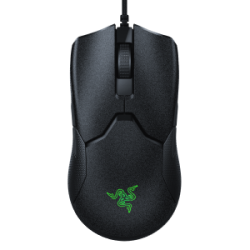
The Razer Viper leaves nothing to chance on your path to glory with its 99.4% resolution accuracy, Razer™ Optical Mouse Switches, and an ultra-light design at just 69 g. It comes with world-class precision, response, and ergonomics.

Device Layout

- Left mouse button
- Right mouse button
- Scroll wheel
- Mouse button 5
- Mouse button 4
- Ultraslick mouse feet
- True 16,000 DPI 5G optical sensor
- DPI indicator
- DPI cycle button
Full Technical Specifications
| Category | Specification |
|---|---|
| Variation | Razer Viper |
| Sensitivity | 5G Advanced Optical Sensor with true 16,000 DPI |
| Acceleration | Up to 450 inches per second (IPS) / 50 G acceleration |
| Ultrapolling | 1000 Hz Ultrapolling |
| Razer Synapse Support | Razer Synapse 3 enabled |
| Razer Chroma | Razer Chroma™ lighting with 16.8 million customizable color options |
| Inter-device Synchronization | Yes |
| On-the-Fly Sensitivity Adjustment | Onboard DPI Storage (Up to 5 DPI stages) DPI toggle on the underside of the mouse |
| Design Factor | 69 g lightweight ambidextrous design |
| Programmable Buttons | 8 independently programmable Hyperesponse buttons |
| Razer Mechanical Switches | Razer™ Optical Mouse Switches with 70 million clicks life cycle |
| Scroll Type | Gaming-grade tactile scroll wheel |
| Approx. Dimensions |
|
| Approx. Weight | 69 g / 0.15 lbs (Excluding Cable) |
| Cable Type | 2.1 m / 6.89 ft Razer™ Speedflex cable |
How To
How do I adjust the DPI setting on a Razer mouse through Razer Synapse?
- Open Razer Synapse.
- Select your mouse on the device list.
- Go to the “PERFORMANCE” subtab.
- Adjust the DPI using the stage options.
- Alternatively, adjust the DPI using the slider at the bottom of the sensitivity section.
See the answer below for more details.
How do I manually change the DPI sensitivity on a Razer mouse?
- Click the DPI stage up button to increase sensitivity
- Click the DPI stage down button to decrease sensitivity
See the answer below for more details
How do I adjust the polling rate on a Razer mouse?
- Open Razer Synapse.
- Select your mouse on the device list.
- Go to the “PERFORMANCE” subtab.
- Select the desired ultrapolling rate under the “POLLING RATE” section.
See the answer below for more details.
How do I ensure smooth operation of the scroll wheel and other Razer mouse parts?
Use compressed air to blow away dirt from the mouse. See the answer below for more details.
How do I use Razer Hypershift on a Razer mouse?
Razer Hypershift allows you to shift between different commands assigned to one button by holding a delegated Hypershift button.
You can view the video below for instructions or review a copy of the video transcript.
See the answer below for more details.
How do I use the "Surface Calibration" on my Razer Mouse?
Surface Calibration allows you to optimize the Razer Precision Sensor to any surface for better tracking. You can configure all Razer and third-party mouse mats with this feature.
See the answer below for more details.
How do I clean my Razer mouse?
Razer devices are built to last extreme gaming sessions and productive work, but dirt and grime accumulate over time and hamper performance and experience.
See the answer below for detailed instructions.
General Information
Will my Razer mouse work on a console?
Yes, but for basic functions only. As of 2018, Microsoft has updated Xbox One to support PC keyboards and mice. However, you cannot use a mouse on Home, settings, in Edge, or within the Xbox user interface while navigating the dashboard. You will also need to use your controller to configure the mouse.
Which buttons can I register for macros on Razer mice?
You can set macros to reflect the majority of keyboard keys except for the Windows keys and enhanced function keys. Mouse button presses are not programmable as macros.
Does the Razer Viper have onboard memory?
No, the Razer Viper does not have onboard memory. It does, however, have onboard DPI Storage (up to 5 DPI stages).
Does the Razer Viper come with a braided cable?
No. The Razer Viper comes with the new Speedflex cable for minimal drag and smooth control.
What is the difference between the Speedflex cable and braided cable?
Speedflex cable is lighter, softer and creates less drag than braided cable. It has greater flexibility and minimal drag for unhindered swipes, allowing for smooth control during your matches.
Applicable Model:
Firmware v1.07.01_r1
- https://rzr.to/PrIDN | September 9, 2020
- Added a 28ms wait period after first click to avoid accidental clicks.
Follow the detailed instructions below to run the updater on your device.
Step-by-step Process
Before you start
-
Make sure the laptop is plugged into a wall outlet and not just running on battery before proceeding.
-
Save all files and close all programs.
-
Download the latest firmware update.
Update process
-
Run the updater as shown below:

-
You may be prompted to confirm changes on your device by the User Account Control. Click "Yes" to confirm these changes.

-
Click "NEXT" to proceed. The installer will close all running Razer applications if you have not done so yet.

-
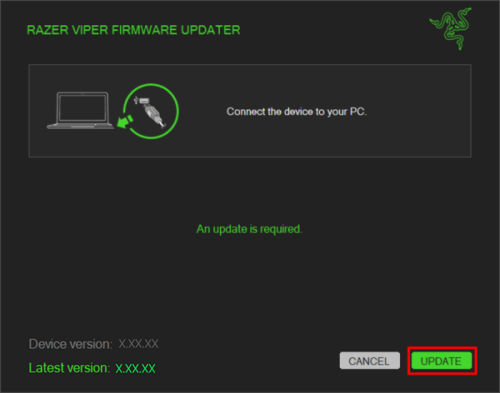
Connect the device to the computer and then click "UPDATE".
-
Wait until the update process is complete. Do not interrupt.

-
When the update is complete, click "CLOSE".
Documentation
Language
User Guide (English)
English
User Guide (Simplified Chinese)
简体中文
Please see our warranty policy for a complete review of our warranty policy.
You are eligible for Limited Warranty support for the following periods of time commencing upon the date of retail purchase of your Product (Warranty Period).
Product
Warranty Period
2021 and Older Model Laptops
1 yeara
2022 and Newer Model Laptops
1 yeara
2-year limited battery warrantya
Razer Viper Mini Signature Edition
3 year
Razer Phone and Phone Accessories
1 year
Razer Edge Gaming Handhelds
1 year
Razer Mice
2 years
Razer Keyboards and Keypads
2 yearsb
Razer Huntsman Signature Edition
5 years
Razer Headsets, Earphones and Earbuds
2 yearsb
Razer Wireless Mouse and Mat Bundles
2 yearsb
Razer Mouse Mats
1 yearc
Razer Speaker Systems and Broadcaster Devices
1 year
Razer Controllers and Chargers
1 year
Razer Routers (except Singtel)
1 year
Razer Routers (Singtel)
2 years
Razer Monitors
1 year
Smart Watches and Eyewear
2 years
Razer Case Fans
2 years
Razer Liquid Cooling
2 years
Razer Power Supplies
5 years
Razer Fan and RGB Controllers
2 years
Razer Cases
1 year
Razer System Accessories
1 year
Razer Docks
1 year
Wearable Air Purifiers
1 year
Razer Gaming Accessories
1 yearc
Razer Rechargeable Batteries for Wireless Devices
1 yeard
Razer Gaming Chairs
3 yearse
Chair Frame, mechanisms and armrests
Up to 5 years
Mesh backing and seat pan
Up to 1 year
All new Products will have the Warranty Periods listed above, subject to applicable local law. Certain "end of life", sell out or discontinued Products may have a shorter Warranty Period; this will be clearly marked at the time of purchase and the given Warranty Period will be stated at that time. Refurbished Products purchased from Razer.com will have the lesser of a 1 year warranty period or the warranty period as stated above. Refurbished products not purchased from Razer.com will have a 90 day warranty period. If you are uncertain whether your Product is eligible for Limited Warranty support, please contact our support team for clarification.
Please note that third-party products may be covered by the product manufacturer's warranty and these warranty terms are exclusively provided by the product manufacturer. Razer does not offer a warranty for third-party products. If you need product or warranty support with your third-party product, please contact the product manufacturer. Please consult the product documentation provided by the product manufacturer for details.
If you are uncertain whether your Product is eligible for Limited Warranty support, please contact our support team for clarification.
Warranty Footnotes
- [a] If you are a customer outside of the U.S. and have validly purchased a Razer Extended Warranty for your product, the Warranty Period shall be extended for another one (1) year period, to be a total of two (2) years commencing upon the date of retail purchase of your Razer Product. The Razer Extended Warranty does not apply to batteries. Aside from the change to Warranty Period, the Razer Extended Warranty does not alter any other terms and conditions of the Limited Warranty.
- [b] Products purchased prior to October 1st, 2018 maintain the original 1 year warranty (keyboards with mechanical switches maintain original 2 year warranty).
- [c] Warranty period for Razer Firefly HyperFlux is 2 years.
- [d] Products purchased prior to October 1st, 2018 maintain the original 6 month warranty.
- [e] Limited Warranty: The Razer Iskur is free from defects in workmanship, materials and construction for three years from the date of purchase. In the event that a defect is found, the manufacturer will either repair or replace the defective item, at its discretion. Exclusions and Limitations: This Limited Warranty does not cover cosmetic damage, minor cosmetic abnormalities and normal wear and tear, including without limitation scratches, dents, discoloration and tears in the head pillow, seat cushion, PU leather, Armrest and stitches of the upholstery.
The following document filter provides a list of documents of conformity for Razer devices based on the model number provided.
No results found
View All
Before you start
-
Make sure the laptop is plugged into a wall outlet and not just running on battery before proceeding.
-
Save all files and close all programs.
-
Download the latest firmware update.
Update process
-
Run the updater as shown below:
-
You may be prompted to confirm changes on your device by the User Account Control. Click "Yes" to confirm these changes.
-
Click "NEXT" to proceed. The installer will close all running Razer applications if you have not done so yet.
-
Connect the device to the computer and then click "UPDATE".
-
Wait until the update process is complete. Do not interrupt.
-
When the update is complete, click "CLOSE".
Documentation
Language
User Guide (English)
English
User Guide (Simplified Chinese)
简体中文
Please see our warranty policy for a complete review of our warranty policy.
You are eligible for Limited Warranty support for the following periods of time commencing upon the date of retail purchase of your Product (Warranty Period).
Product
Warranty Period
2021 and Older Model Laptops
1 yeara
2022 and Newer Model Laptops
1 yeara
2-year limited battery warrantya
Razer Viper Mini Signature Edition
3 year
Razer Phone and Phone Accessories
1 year
Razer Edge Gaming Handhelds
1 year
Razer Mice
2 years
Razer Keyboards and Keypads
2 yearsb
Razer Huntsman Signature Edition
5 years
Razer Headsets, Earphones and Earbuds
2 yearsb
Razer Wireless Mouse and Mat Bundles
2 yearsb
Razer Mouse Mats
1 yearc
Razer Speaker Systems and Broadcaster Devices
1 year
Razer Controllers and Chargers
1 year
Razer Routers (except Singtel)
1 year
Razer Routers (Singtel)
2 years
Razer Monitors
1 year
Smart Watches and Eyewear
2 years
Razer Case Fans
2 years
Razer Liquid Cooling
2 years
Razer Power Supplies
5 years
Razer Fan and RGB Controllers
2 years
Razer Cases
1 year
Razer System Accessories
1 year
Razer Docks
1 year
Wearable Air Purifiers
1 year
Razer Gaming Accessories
1 yearc
Razer Rechargeable Batteries for Wireless Devices
1 yeard
Razer Gaming Chairs
3 yearse
Chair Frame, mechanisms and armrests
Up to 5 years
Mesh backing and seat pan
Up to 1 year
All new Products will have the Warranty Periods listed above, subject to applicable local law. Certain "end of life", sell out or discontinued Products may have a shorter Warranty Period; this will be clearly marked at the time of purchase and the given Warranty Period will be stated at that time. Refurbished Products purchased from Razer.com will have the lesser of a 1 year warranty period or the warranty period as stated above. Refurbished products not purchased from Razer.com will have a 90 day warranty period. If you are uncertain whether your Product is eligible for Limited Warranty support, please contact our support team for clarification.
Please note that third-party products may be covered by the product manufacturer's warranty and these warranty terms are exclusively provided by the product manufacturer. Razer does not offer a warranty for third-party products. If you need product or warranty support with your third-party product, please contact the product manufacturer. Please consult the product documentation provided by the product manufacturer for details.
If you are uncertain whether your Product is eligible for Limited Warranty support, please contact our support team for clarification.
Warranty Footnotes
- [a] If you are a customer outside of the U.S. and have validly purchased a Razer Extended Warranty for your product, the Warranty Period shall be extended for another one (1) year period, to be a total of two (2) years commencing upon the date of retail purchase of your Razer Product. The Razer Extended Warranty does not apply to batteries. Aside from the change to Warranty Period, the Razer Extended Warranty does not alter any other terms and conditions of the Limited Warranty.
- [b] Products purchased prior to October 1st, 2018 maintain the original 1 year warranty (keyboards with mechanical switches maintain original 2 year warranty).
- [c] Warranty period for Razer Firefly HyperFlux is 2 years.
- [d] Products purchased prior to October 1st, 2018 maintain the original 6 month warranty.
- [e] Limited Warranty: The Razer Iskur is free from defects in workmanship, materials and construction for three years from the date of purchase. In the event that a defect is found, the manufacturer will either repair or replace the defective item, at its discretion. Exclusions and Limitations: This Limited Warranty does not cover cosmetic damage, minor cosmetic abnormalities and normal wear and tear, including without limitation scratches, dents, discoloration and tears in the head pillow, seat cushion, PU leather, Armrest and stitches of the upholstery.
The following document filter provides a list of documents of conformity for Razer devices based on the model number provided.
No results found
View All
Update process
-
Run the updater as shown below:
-
You may be prompted to confirm changes on your device by the User Account Control. Click "Yes" to confirm these changes.
-
Click "NEXT" to proceed. The installer will close all running Razer applications if you have not done so yet.
-
Connect the device to the computer and then click "UPDATE".
-
Wait until the update process is complete. Do not interrupt.
-
When the update is complete, click "CLOSE".
| Documentation | Language |
|---|---|
| User Guide (English) | English |
| User Guide (Simplified Chinese) | 简体中文 |
Please see our warranty policy for a complete review of our warranty policy.
You are eligible for Limited Warranty support for the following periods of time commencing upon the date of retail purchase of your Product (Warranty Period).
| Product | Warranty Period |
|---|---|
| 2021 and Older Model Laptops | 1 yeara |
| 2022 and Newer Model Laptops | 1 yeara 2-year limited battery warrantya |
| Razer Viper Mini Signature Edition | 3 year |
| Razer Phone and Phone Accessories | 1 year |
| Razer Edge Gaming Handhelds | 1 year |
| Razer Mice | 2 years |
| Razer Keyboards and Keypads | 2 yearsb |
| Razer Huntsman Signature Edition | 5 years |
| Razer Headsets, Earphones and Earbuds | 2 yearsb |
| Razer Wireless Mouse and Mat Bundles | 2 yearsb |
| Razer Mouse Mats | 1 yearc |
| Razer Speaker Systems and Broadcaster Devices | 1 year |
| Razer Controllers and Chargers | 1 year |
| Razer Routers (except Singtel) | 1 year |
| Razer Routers (Singtel) | 2 years |
| Razer Monitors | 1 year |
| Smart Watches and Eyewear | 2 years |
| Razer Case Fans | 2 years |
| Razer Liquid Cooling | 2 years |
| Razer Power Supplies | 5 years |
| Razer Fan and RGB Controllers | 2 years |
| Razer Cases | 1 year |
| Razer System Accessories | 1 year |
| Razer Docks | 1 year |
| Wearable Air Purifiers | 1 year |
| Razer Gaming Accessories | 1 yearc |
| Razer Rechargeable Batteries for Wireless Devices | 1 yeard |
| Razer Gaming Chairs | 3 yearse |
| Chair Frame, mechanisms and armrests | Up to 5 years |
| Mesh backing and seat pan | Up to 1 year |
All new Products will have the Warranty Periods listed above, subject to applicable local law. Certain "end of life", sell out or discontinued Products may have a shorter Warranty Period; this will be clearly marked at the time of purchase and the given Warranty Period will be stated at that time. Refurbished Products purchased from Razer.com will have the lesser of a 1 year warranty period or the warranty period as stated above. Refurbished products not purchased from Razer.com will have a 90 day warranty period. If you are uncertain whether your Product is eligible for Limited Warranty support, please contact our support team for clarification.
Please note that third-party products may be covered by the product manufacturer's warranty and these warranty terms are exclusively provided by the product manufacturer. Razer does not offer a warranty for third-party products. If you need product or warranty support with your third-party product, please contact the product manufacturer. Please consult the product documentation provided by the product manufacturer for details.
If you are uncertain whether your Product is eligible for Limited Warranty support, please contact our support team for clarification.
Warranty Footnotes
- [a] If you are a customer outside of the U.S. and have validly purchased a Razer Extended Warranty for your product, the Warranty Period shall be extended for another one (1) year period, to be a total of two (2) years commencing upon the date of retail purchase of your Razer Product. The Razer Extended Warranty does not apply to batteries. Aside from the change to Warranty Period, the Razer Extended Warranty does not alter any other terms and conditions of the Limited Warranty.
- [b] Products purchased prior to October 1st, 2018 maintain the original 1 year warranty (keyboards with mechanical switches maintain original 2 year warranty).
- [c] Warranty period for Razer Firefly HyperFlux is 2 years.
- [d] Products purchased prior to October 1st, 2018 maintain the original 6 month warranty.
- [e] Limited Warranty: The Razer Iskur is free from defects in workmanship, materials and construction for three years from the date of purchase. In the event that a defect is found, the manufacturer will either repair or replace the defective item, at its discretion. Exclusions and Limitations: This Limited Warranty does not cover cosmetic damage, minor cosmetic abnormalities and normal wear and tear, including without limitation scratches, dents, discoloration and tears in the head pillow, seat cushion, PU leather, Armrest and stitches of the upholstery.

