
Applicable models:
- Razer Aether Lamp | RZ43-0407
- Razer Aether Lamp Pro | RZ43-0408
- Razer Aether Light Bulb | RZ43-0425
- Razer Aether Light Strip | RZ43-0424
A reset is required to pair your Razer Aether light with a new device.
Follow the detailed instructions below to reset your Razer Aether light.
Select your Razer Aether light
Razer Aether Lamp
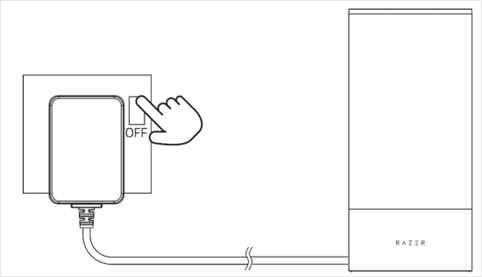
Switch off the power supply of the Razer Aether Lamp.
Press and hold the multi-function button, then switch on the power supply and continue holding the multi-function button for four seconds.
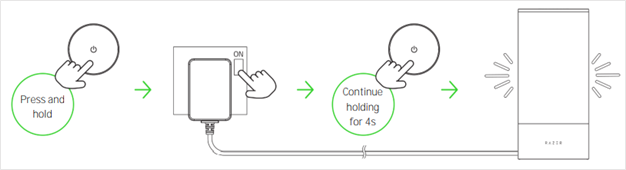
Note: The Razer Aether Lamp will briefly cycle through red, green, and blue before displaying white. This means the reset is successful.
- Launch the Razer Gamer Room App to start connecting the Razer Aether Lamp to a new mobile device. See How to pair the Razer Aether Lamp with a new device for instructions.
Razer Aether Lamp Pro
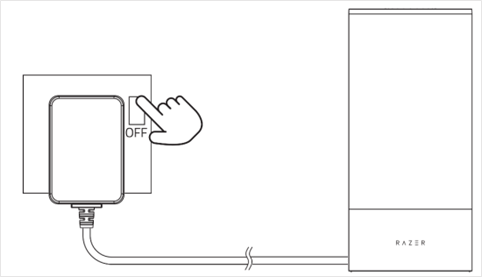
Switch off the power supply of the Razer Aether Lamp Pro.
Press and hold the power button, then switch on the power supply and continue holding the power button for four seconds.
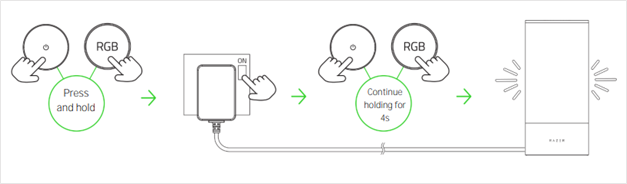
Note: The Razer Aether Lamp Pro will briefly cycle through red, green, and blue before displaying white. This means the reset is successful.
- Launch the Razer Gamer Room App to start connecting the Razer Aether Lamp Pro to a new mobile device. See How to pair the Razer Aether Lamp Pro with a new device for instructions.
Razer Aether Light Bulb
Turn the Razer Aether Light Bulb on and off four times at one-second intervals.
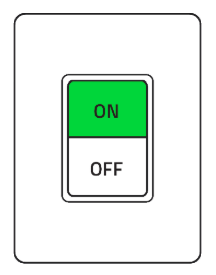
Turn on the device again.
Note: The Razer Aether Light Bulb will briefly cycle through colors before turning white. This means the reset is successful and pairing mode is activated.
Razer Aether Light Strip
Switch off the power supply of the Razer Aether Light Strip.
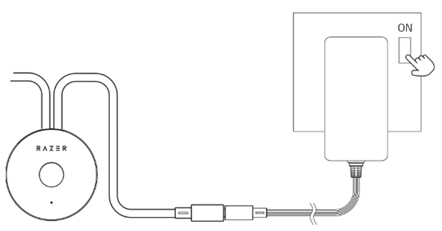
Press and hold the multi-function button, then switch on the power supply and continue holding the multi-function button for four seconds.
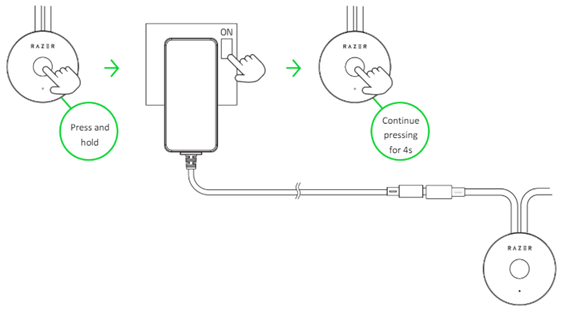
Note: The Razer Aether Light Strip will briefly cycle through red, green, and blue before displaying white. This means the reset is successful.
- Launch the Razer Gamer Room App to connect the Razer Aether Light Strip to a new mobile device. See How to pair the Razer Aether Light Strip for instructions.

