
If you experience problems connecting the Razer Edge to a computer, perform these troubleshooting steps to resolve the issue:
Note: Before you proceed, ensure the Razer Edge is up to date. Refer to How to check for software updates on the Razer Edge.
Step-by-step process:
-
Plug in the Razer Edge into the PC.
-
Tap the notification on the Razer Edge to check if you have successfully connected to the PC.
-
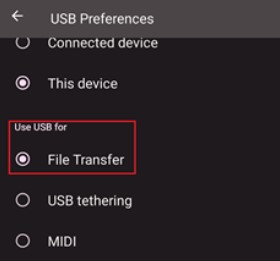
Enable File Transfer.
- Go to “Settings” > “Connected devices”.
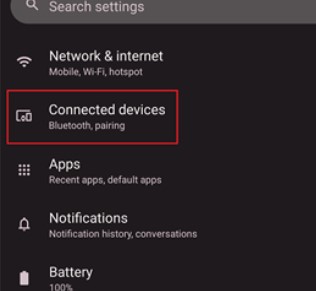
- Tap “USB”.
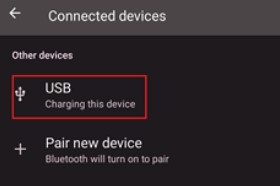
- Select “File Transfer”.
- Go to “Settings” > “Connected devices”.
-
If the PC fails to detect the Razer Edge, boot the Razer Edge to safe mode to isolate if a third-party application is causing the issue.
-
Connect the Razer Edge to the PC again while in safe mode.
-
If the issue persists, back up your data and perform a factory reset.

